BT physical keyboard ignores SPANISH layout

User 01
Esk99l · 2026-05-22 17:14 · 3 comments
After following BOOX and forums instructions to set up correctly a Spanish layout for my external physical keyboard I have to say that IT DOES NO T WORK. I have set up Languages to "español (España)", then I set up Android Keyboard (AOSP) to use Spanish as introduction method (including expert settings with Español (QWERTY). I also set up ONYX keyboard. In a text application I went to every keyboard and language (both Spanish and English) and none of them worked to write "ñ" or accents like "ó". Funny thing is that I am writing this with same Bluetooth keyboard and my Android mobile phone where everything works like a charm. But my 500€ Boox device is not capable to understand Spanish layout. Please, let me how to fix this terrible issue to make this keyboard work out of the boox. It is not the official BOOX keyboard, but as you can see in this post in other Android devices it perfectly works for Spanish layout. Firmware in boox Air 5 C seems to be up to date (March 2026 - Version firmware 2025-12-05 with Android 15), so I guess is such a big bug or a very hidden option in configuration that keeps the keyboard in the English layout forever and ever. This is a very big problem for me to continue with old devices if not fixed soon. Beg for a solution. Thanks!!
3 comments

You need to log in to comment
  • BOOX Shop Service 2026-05-22 17:19

    Dear customer,
    In this case, please connect your Note Air 5 C to the external physical keyboard first. Then, you could try to go to Settings > More Settings > Physical Keyboard > Keyboard Layout > Add keyboard layout > enable Spanish. Then, please select the Spanish keyboard layout. After that, please check if the problem can be fixed.

  • Esk99l 2026-05-22 17:19

    I followed your instructions carefully word by word. IT does NOT WORK. English layout seems to be fixed no matter which option I enable.
    After check that it did not work:

    • Again I tried to change keyboards (AOSP and ONYX).
    • And for each one I tried to change layout (from English to Spanish and from Spanish to English).
      No matter which keyboard or layout is selected. Everytime i push 'ñ' in my physical keyboard, ";" is shown in screen. "ñ" works fine with the ONYX screen keyboard, but not with bluetooth physical keyboard. English seems to be fixed and layout selection is show in screen but is simply ignored by a text editor program.

    As I said this external bluetooth keyboard works fine with Spanish layout in a mobile with Android 13 and also in an iPad, but not with Boox Note Air 5 C with Android 15 , firmware versión 2025-12-05_14-39_4.1.2-rel_1205_da3fc7661 (not new updates available).

    Please, could you provide a solution? Looking forward to check one that works.
    Thanks.

  • BOOX Shop Service 2026-05-22 17:19

    Dear customer,

    Thank you for your reply and we apologize for the inconvenience. Due to certain changes in Android 15, switching to the Spanish layout is currently unavailable. Our development team has already been assigned to address and fix this issue. As a temporary workaround, you can use Gboard to enable the Spanish layout. Please follow the steps below:

    1. Install Gboard.

    2. Go to the system Settings → More Settings → Language & Input Method → Check the box for "Gboard".

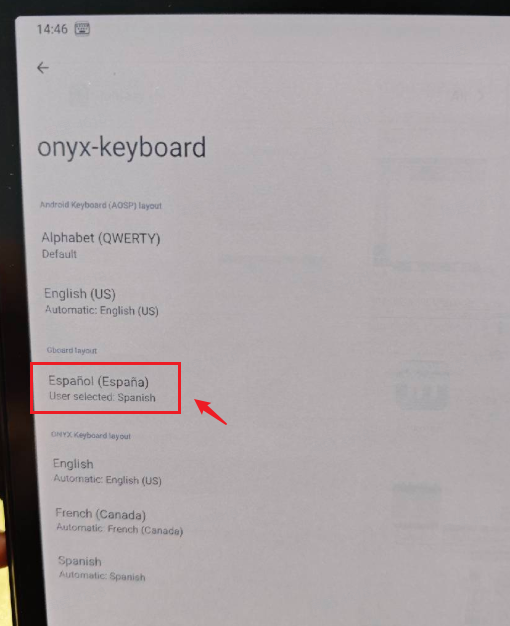
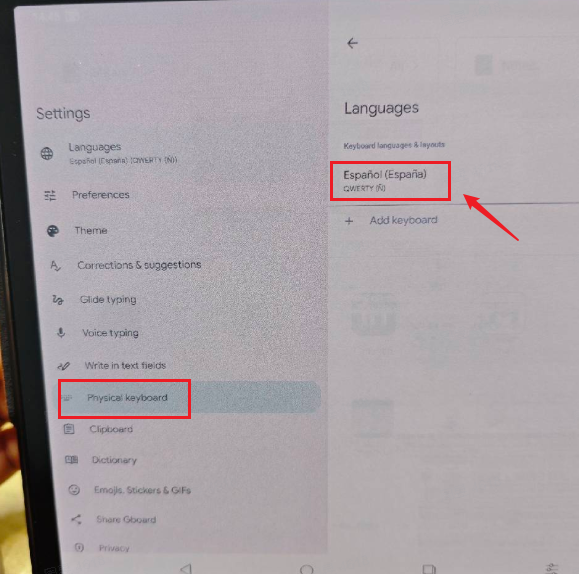
    3. After enabling Gboard, tap "Gboard" to enter its settings. Then, connect your Bluetooth keyboard. Once connected, the "Physical Keyboard" option will appear in Gboard settings. Tap it, select "Languages", add "Español", and return to the previous menu.


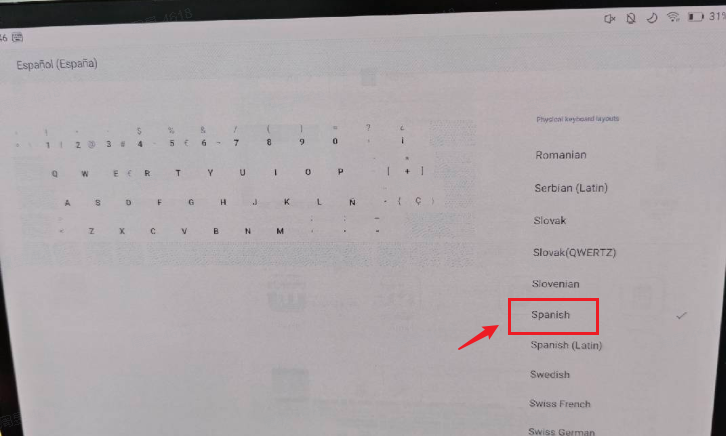
    4. Tap "System Physical Keyboard Settings" → Select the name of your connected physical keyboard → Under Gboard Layout, choose "Español". Then, scroll down in the physical keyboard layout list and select "Spanish".

    Once configured, your physical keyboard will function with the Spanish layout.