copy-paste

Hi,
In my Boox Tab X notes app I tried to do the following. Laso select a text in one page, do copy and go to another page and paste it there. This works if I use the arrows in the page navigation to go through the pages of the document to the page I want to paste to. However, if I use the thumbnail view of the page navigation it seems not possible to paste in the page I go to. This is awkward because imagine I have 100 pages in that document and I wanted to copy something from page one and go and paste it on page 100. It is very cumbersome to use the arrows to navigate page by page from 1 to 100. Is there a way to streamline that copy-paste operation in this case?
Thanks
-
正式評論

Dear customer,
After you copy and jump to another page by using the thumbnail view, you can click the Lasso tool again and click "Paste". After that, you will be able to paste the item on the current page. -

How do I click "Paste" after selecting the Lasso tool in Notes? I can't open the context menu unless I select some strokes on the new page with the lasso, but when I do that, tapping the Paste icon will copy that stroke instead! I'm using a Boox Note Air 4C and the version number is 2025-07-26_19-00_4.1.
0 -
Hi Joni,
After you use the lasso tool to select and copy notes, you can long-press an empty area on the notebook, and a "Paste" button will pop up. Then, you can click the "Paste" button to paste the notes.0 -
Thank you for the quick reply!
The popup button doesn't appear with the Lasso tool selected even after 10 seconds of pressure. With a pen selected, it will leave a dot (or, if AI shape recognition is enabled, a small line or bracket), but still no popup.0 -
Hi Joni,
In this case, you could check if the long-press gesture is enabled. If not, please enable it.
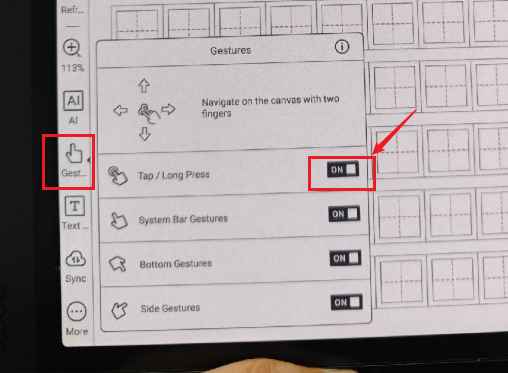
After that, please try to use your finger to long-press the empty area of the page and check if it is possible to paste the notes. For your reference, please check the video at the link below:https://drive.google.com/file/d/1c_PnRwTU8Bs9uOPhLLEF5hC8lQdzy0nG/view?usp=drive_link
0 -
Yes, that was it. Thank you!
0 -
Hi Joni,
Thank you for your feedback, and we are glad the problem is solved. We hope you have a wonderful day!0
請登入寫評論。
評論
7 條評論