To Do / Follow-up list

Hi all,
I am using Go 10.3 with latest software updates. As I am in management role, my main use of the device is note taking during meetings, not necessarily translating it into text, as the handwriting form is perfectly fine. I tried to use downloaded Microsft OneNote to have synchronisation with all corpo apps, but it doesn't really work well with hand writing, it has huge lag. On the other hand the native Notepad app is really good, therefore I keep using it with great effect.
There is few things missing though and I sincerely hope that someone from dev team at Onyx will read this.
The main thing is adding on the go ToDo or follow-up items within the notes I am taking. There is Tags option which is really close to what would be the perfect solution. What is missing is the management of tags. Instead of hiding it under Search function this could be a separate Tags icon & window with all tags listed and possibility to add due date, done/not done, etc. like in general ToDo apps. Also clicking on a given Tag (follow-up item) should lead immediately to the marked part of the text, rather than going first through selection of notes where the tag has been applied.
Next, less important but potentially useful, would be to add functionality to AI selection of the text. Currently, when circling around a text, the AI box appears around it with the main function of transforming the handwritten note to text. It would be great to add to the selected AI box additional micro icon (similar to the current Rotation icon displaying in the lower right corner of the selection). That icon would be Delete (trash bin), so that it would work as kind of Lasso Eraser.
Last suggestion would be to avoid changing the icon of Folder from initial folder view to box with micro icons of notes pages. When pressing longer on the folder itself, the Options menu appears with the possibility of Custom Cover. Then there should be a pre-defined selection of folder icon views rather than only possibility of creating the custom pictures.
Other than that I am really happy with using the device and it greatly improved my organisation from moving away from paper notebook. I would REALLY appreciate considering improvement of Tags management as most important flaw in the operating system.
-
正式評論

Dear customer,
Thank you very much for your feedback and suggestions.
Regarding the issue of using OneNote, you can open the OneNote app > swipe down from the top right of the screen to bring up the Control Center > E Ink Center > set the refresh mode to "Normal" > then click "Optimize" > Other > enable "Handwriting Optimization". After that, please check if it is possible to improve the handwriting experience.
To find the tag management, you can go to Notes > Click the hamburger icon on the top right corner > Options > Tag Management.
Regarding using the lasso tool to delete notes, you can click "Cut" or "Delete" to remove the selected notes.
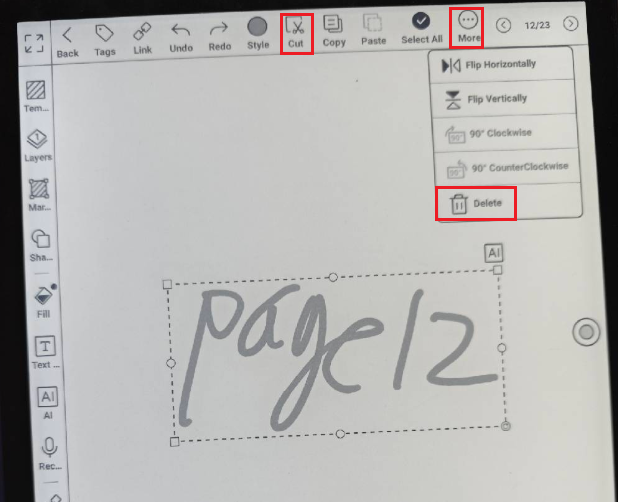
Regarding your suggestion about the cover of the folder, we have forwarded your suggestion to the relevant department. Thank you very much for your support and understanding!
請登入寫評論。
評論
1 條評論