How to exit the note taking mode in NeoReader

Hi,
On Boox tab X with the latest firmware update I wrote some notes in a pdf in NeoReader. Now it seems I am stuck in the note taking mode and every time I touch the screen with the stylus it leaves a mark. How can I quit the note taking mode and return to normal reading mode in NeoReader?
-
正式評論

Dear customer,
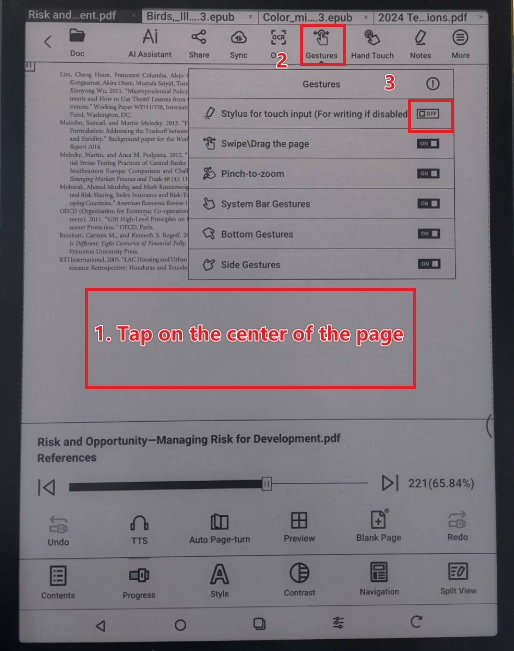
We apologize for the inconvenience. In this case, you can open the PDF. Then you can follow the steps below to turn on "Stylus for touch input". After that, please check if it is possible to fix the problem.
-
Hi,
Thank you for replying. NeoReader is a good app with many capabilities but what you have described here is one complicated way of switching between modes. Surely this can be done with just one touch, instead of going through 3 steps. Maybe something Boox can think about for next versions of the software.
0 -
Dear customer,
In this case, you can also enter the writing mode by clicking the pen icon on the toolbar.
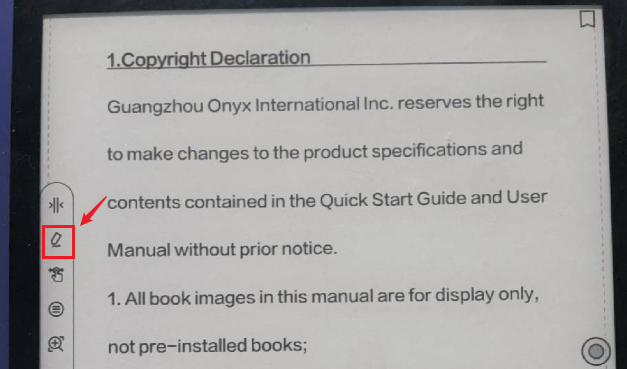
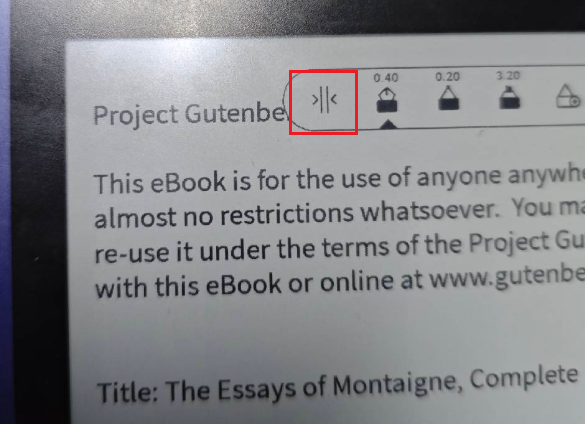
If you want to exit the writing mode, you can click the collapse icon on the toolbar.
 0
0
請登入寫評論。
評論
3 條評論