Restore Auto-Sync to Third-Party Clouds Without Onyx Account

In firmware 4.0, we could auto-sync notes to third-party cloud services (e.g. Google Drive) without using Onyx Cloud. After binding an account and selecting a format, the sync switch enabled automatic uploads for all notes.
In firmware 4.1, the sync switch is locked unless logged into an Onyx account — even for third-party services. This forces manual syncing of each note, which used to work automatically.
Please restore auto-sync functionality for third-party services without requiring an Onyx account, as it worked in previous firmware. This is important for workflow efficiency.
Thank you.
-
正式評論

Dear customer,
We apologize for the inconvenience.
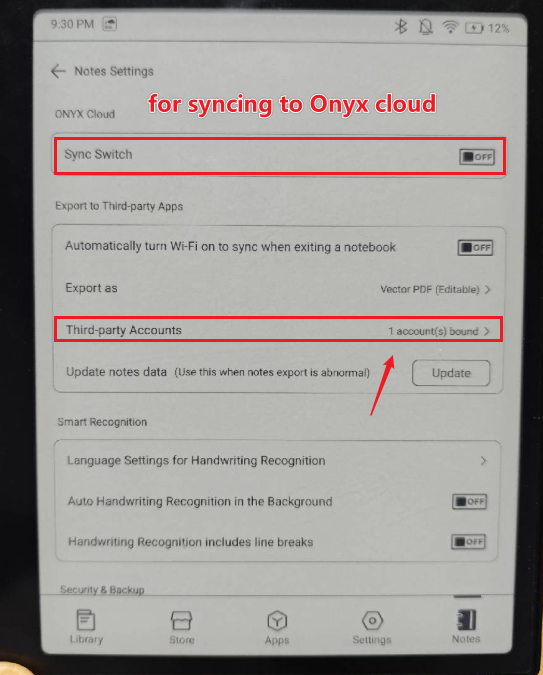
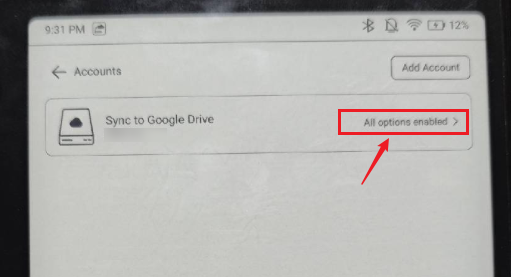
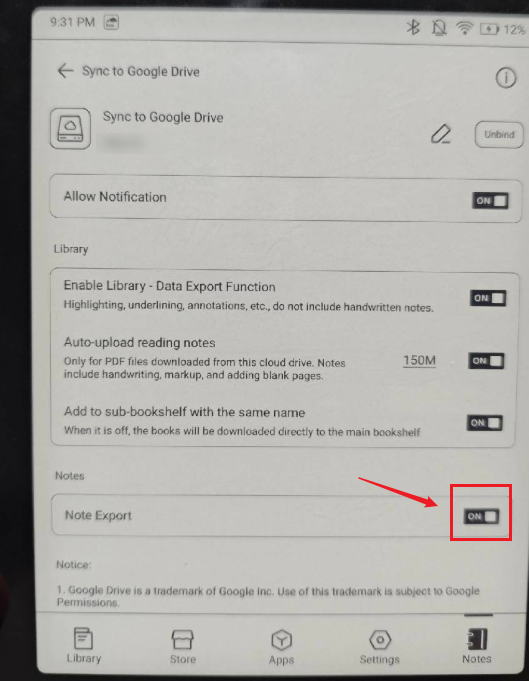
Upon testing, it does not require an Onyx account to sync notes to the 3rd-part clouds. You can bind a 3rd-party cloud storage account to the BOOX device without logging in to an Onyx account.
The Sync Switch under the "Onyx Cloud" is for syncing to the Onyx cloud, not to the 3rd-party cloud.
If you want to turn on or off the synchronization with the 3rd-party cloud, you can follow the steps below:
-

I believe Manb means that the "Sync" button in the top right corner on the notes list screen used to trigger sync even without having an Onyx account. Now, clicking on it gives an error: "ONYX cloud sync has been turned off".
Can you please make this button again independent from the Onyx account?
0 -
Hi Kamil,
We are afraid that the Sync button in the top right corner of the notes list screen is only used to sync notes with the Onyx cloud. If you want to manually sync notes to the 3rd-party cloud, you could long-press the notebook cover > Sync > find the 3rd-party > click "Manual Sync". Many thanks for your understanding.0 -
I see the only way to trigger manual sync is note-by-note. If you mean this way, then it definitely looks like an entshitification - before there definitely was a way to trigger manual sync for all notes at once.
0 -
Hi Kamil,
We are afraid that there is no option to sync all existing notes to the 3rd-party cloud at once. However, you can go to Notes > click the hamburger icon on the top right corner > Note Settings > enable "Automatically turn Wi-Fo on to sync when exiting a notebook". In this case, you can sync an existing notebook to the 3rd-party cloud by opening it and closing it immediately.0 -

The point is though - there WAS an option to sync all existing notes to the 3rd-party cloud at once. It was what the Sync button did.
BRING IT BACK
0
請登入寫評論。
評論
6 條評論