New booxtab XC frustration with input keyboard

Hi,
I got the boox tab xc since about a week ago, and I want to use the Gboard keyboard as my keyboard, so I can use the swipe option.
However, Onyx enforces you to use their own keyboard it seems. The Gboard gets killed after 1 minute setting it as your default keyboard every time.
How can I fix this?! Because this is extremely frustrating to me.
I already disabled the onyx keyboard through ADB, but now after it gets killed I end up with Google voice typing.
I tried killing multiple onyx services that I thought might be related to the freezing, but to no avail.
I am unable to unfreeze on long press the Gboard app. Also, the app does not show up in the list of apps inside the freeze app settings. Setting the freeze inside the settings to DO NOT FREEZE does not make any difference.
Please help!
-
正式評論

Dear customer,
We apologize for the inconvenience. In this case, you can go to the home page > Long-press the Gboard app icon > please check if there is an "Unfreeze" button. If so, please press the unfreeze button and check if the problem can be fixed.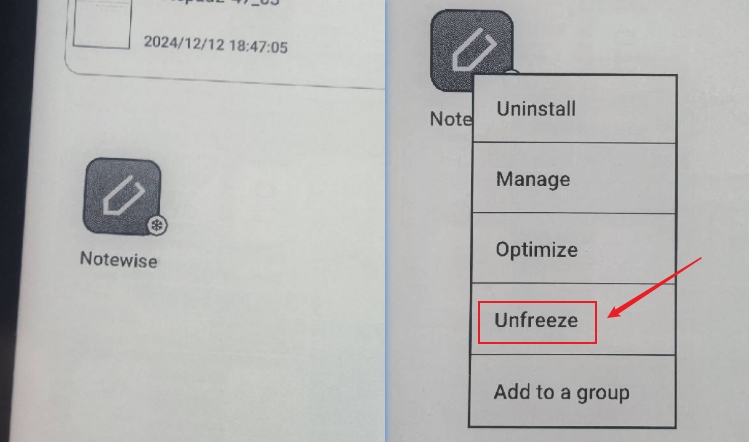
Many thanks for your time and understanding.
-
There is no unfreeze button for a keyboard app like Gboard. For other apps I installed there is, but not for Gboard.
Can you guide me step by step on how to completely get rid of the freezing app modification?
Or at least on how to not have it getting frozen after 1 minute of setting it as my input device?I figured out now that uninstalling the app and reinstalling it does not freeze it immediately anymore.
It seems like it takes a couple of days before it gets activated in the Onyx Software with new apps before it starts to auto-freeze it within a minute.
Any solution would be great!1
請登入寫評論。
評論
2 條評論