Unable to open a boox account, not able to receive the authentical code on my phone

Unable to open a boox account, as not able to receive the authentical code on my phone.
- have tried different phone number, no code received.
- I do have the email authentical code
-
正式評論

Dear customer,
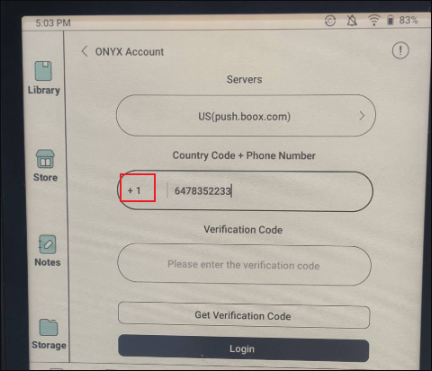
We apologize for the inconvenience. In this case, please check if you have entered the country code and whether the format of your phone number is correct. For your reference, please check the picture below:
-
The country code and phone number is correct.
I just got the new note Air 4c... could it be the unit hard ware problems?
0 -
Dear customer,
We apologize for the inconvenience. If the problem persists, please update the firmware to the latest version first. You could update the firmware via "Settings" > "More Settings" > "System Update" on your device.Then, please go to "Settings" > "More Settings" > "Date and Time" > turn on or off "Automatically Set". Please make sure you select the correct time zone and check whether the time on the device is matching with your local time.
If still have the problem, please try to connect to another Wi-Fi network or mobile hotspot. Then, please check if the problem can be fixed.
If still unable to fix the problem, we would appreciate it if you could submit feedback via "Settings" > "FAQ & Feedback" > "+" on your device. Please make sure that you tick the option "send logs" and please describe the question and provide us with your phone number in the feedback. Our tech team will get back to you via the feedback system.
0
請登入寫評論。
評論
3 條評論