“Smart Button per-app setting” disappeared on Boox Go Color 7 (Firmware v4.1)

Hi everyone,
I’m using a Boox Go Color 7, and I noticed something strange after updating to firmware version 4.1.
Previously, under Settings → Smart Button, there was an option that allowed me to set Smart Button functions for individual apps (for example, I could assign different button behaviors depending on which app was active).
However, after the latest update, that option is gone.
Now I only see:
-
“Preferred button function”
-
“Long-press function”
There’s no per-app customization anymore — I can only choose global functions.
I’ve already checked:
-
I’m on the latest firmware (v4.1, no newer updates available).
-
Smart Button “reset” only resets the long-press function, not the whole button mapping.
-
I’m using the default launcher (no third-party launchers).
-
I’ve tried restarting and checking all system settings — the option truly seems to have disappeared.
So I’m wondering:
-
Was this feature intentionally removed in firmware 4.1?
-
Or is it possibly a bug or UI glitch on the Go Color 7 model?
-
Has anyone else with this device noticed the same change?
If anyone has a workaround (like restoring the old Smart Button behavior, or enabling per-app mappings again), please share!
Thanks in advance 🙏
Device: Boox Go Color 7
Firmware: V4.1 (latest)
Issue: “Per-app Smart Button” setting missing
-
正式評論

Dear customer,
In firmware 4.1, we moved the short-press function settings to the app's optimization. In this case, you can go to Apps > Long-press an app's icon > Optimize > Other > Customize Buttons. After that, you can change the side buttons for the app.
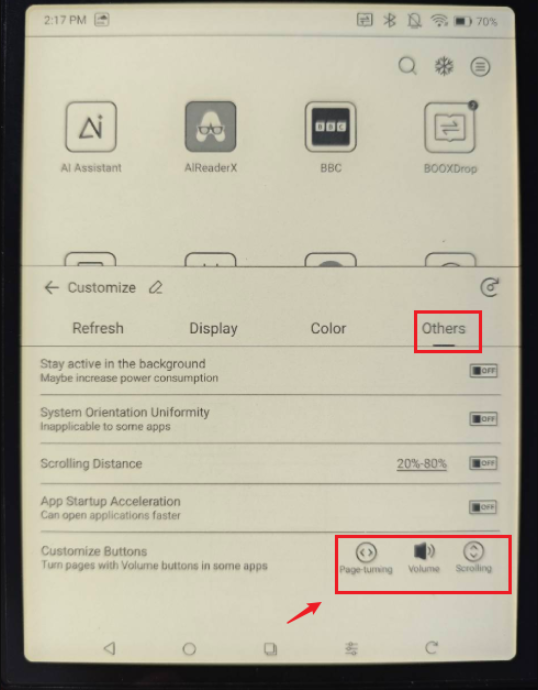
Many thanks for your understanding. -

When I follow your directions in both my Kindle and my Simon & Schuster app, the smart buttons still do not turn pages. Can you please help?
0 -
Hi Hrhaahr,
To use the side buttons to turn pages in the Kindle app, you can first set the side buttons as "Volume" for the Kindle app. Then, you can enable "Turn Pages with Volume Controls" in the Kindle app. After that, it should be able to turn pages by using the side buttons in the Kindle app. For your reference, please check the video at the link below:
https://drive.google.com/file/d/1WlZA3H2Ob4btYSrkGahmGwLerMPPW3VR/view?usp=drive_link
For the Simon & Schuster apps, you would need to do the same settings as the Kindle app. If the app does not support turning pages with the volume button, we are afraid that it is unable to use the side buttons of the BOOX device to turn pages.
0
請登入寫評論。
評論
3 條評論