Note Air 4 C - official book reader doesn't see offline dictionaries

I've read all the instructions I managed to find, but nothing works:
1. I downloaded dictionaries
2. I created the unique folder for each dict
3. I put the 3 files (.ifo, .idx, .dz) to the dict folder.
4. The dict folder I put to the system folder "dicts" that was on my device
5. I chose this new dictionary in the setting "preferred dictionaries". I even tried to uncheck the online dict there
official book reader doesn't see offline dictionaries. No matter these dicts are placed in the right folder. Device reboot doesn't help.
I bought this e-reader for reading books in other langs, but I cannot do it now =(
-
正式評論

Dear customer,
We apologize for the inconvenience. We are afraid that the dictionary will not work if you put the direct dictionary files (
.ifo,.idx,.dz) in the "dicts" folder. In this case, you can try to create a new folder in the "dicts" folder and name the folder as the name of your dictionary. Then, you could put the dictionary files (.ifo,.idx,.dz) in the new folder you create. After that, please check if the BOOX device can detect the dictionary. -

Hi! I also got problems with this. Being curious and stubborn i tried plenty different things to get this work.
- i tried different format (starDict and mdx),
- i put files in different folder inside dict folder
- i checked that file name exactly same as folder name (and different too)
- i tried (for stardict) different versions 3.*.* and 2.4.*
- i tried compressed file (dz) and plain dict (dict)
- i tried differen ifo sametypesequence=h/m/u... (and corresponding format of dict - with html or not)
- i tried dictionary from dictionary app
- i tried in neoreader....
maybe i did not try like all combinations of listed above.. but still.
what i do have - i see new dictionary in list (in most cases)
i don't see matches by word (both in dict app and reader) and yes - i tried without morphology too (like 'do' not 'did'), however if this dictionary works only without morphology its serious limitation for me (as i'm learning french and this is really important case)
so. nothing. and this is really upsetting
and one more - additional dictionaries is also pain. like, i tried to connect not set of words to build in dictionary, but use separate app as native - and no luck for translating from neo-reader (tapping word in context menu) i understand, that there is some requirements to integration to this apps, but any? could any of them work (for example i tried Lingvo Dictionaries Offline, which seems have to work, but not)
Additional details: i have note 5c, and in general i really happy with device. but not with this functionality...sum up:
- where can i find exact specification for dictionaries (not that one short in docs, like with ALL details)
- which apps (would be great to have both list with possible apps, and exact requirements for apps) could be used as additional dictionaries?
- any (real!) plans and timelines to improve this functionality.
I would really appreciate the specific answers to that questions.
Thank you in advanced.
0 -
Dear customer,
We sincerely apologize for the inconvenience. If you see the dictionary in the list, but it does not work, please check if the language of your dictionary matches the language of the word you are checking. For example, if you are checking an English word, please switch the dictionary to the English dictionary. Otherwise, it will not work.
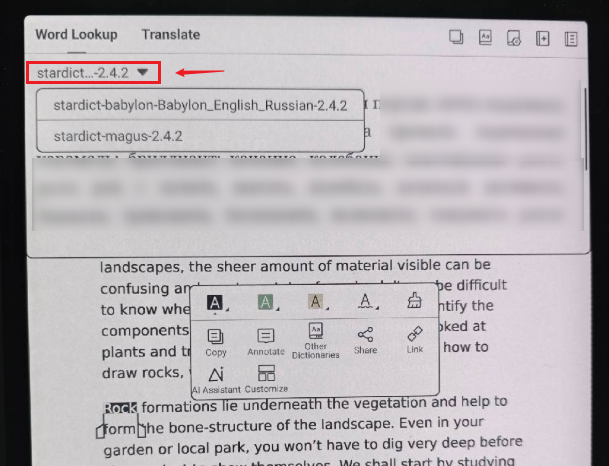
In this case, we have forwarded your feedback to the relevant department and will do our best to improve the software of our device in the future.
Currently, you could try to open a book and a 3rd-party dictonary app in split-screen view. Then, you can check the work and read a book at the same time. Many thanks for your understanding.
0
請登入寫評論。
評論
3 條評論