Boox Go 10.3: "Highlight text after selection" option missing.

In the neoreader app, when I select some text, the window with options pops up every time, which makes highlighting time consuming. Several posts on the internet seem to suggest to toggle the option More > Settings > Global Settings > Highlight text after selection, but this is missing on my Boox Go 10.3 (firmware updated to the latest V4.1). The problem persists even if toggling the Word Selection Mode into More > Settings > Annotation Toolbar & Dictionary Settings > Select Text for Word Lookup & Translation.
-
正式評論

Dear customer,
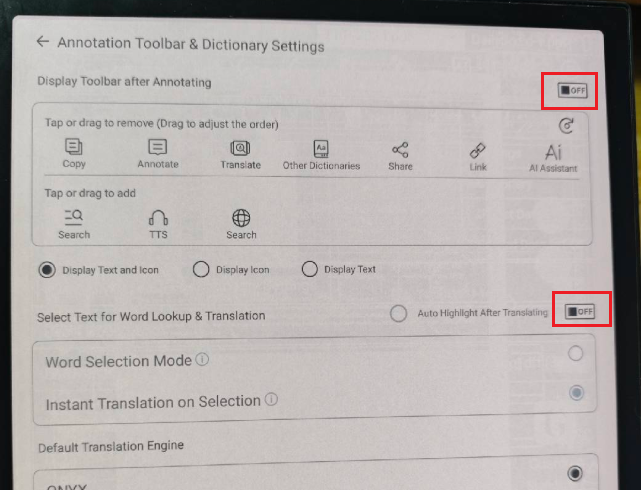
We apologize for the inconvenience. In this case, you could try to open a book > tap on the center of the page to bring up the menu > click "More" on the top right corner > Settings > Annotation Toolbar & Dictionary Settings > toggle off both "Display Toolbar After Annotating" and "Select Text for Word Lookup & Translation". After that, please check if it is possible to solve the problem.
-
Toggling off the option "Display Toolbar after Annotating" worked, thank you very much. I thought I had already tried that, but apparently I had not.
0 -
Dear customer,
Thank you for your reply, and we are glad the problem is solved. We hope you have a wonderful day!0
請登入寫評論。
評論
3 條評論