nova air cover buttons don't work properly for every app

I've noticed that the up and down buttons on the cover for the nova air only allow you to move between pages in Boox apps. But in 3rd party apps, it turns into volume control instead.
Can I have control over what those buttons actually do? I never want to use them to control volume. I only want them to allow me to move between pages or scroll up and down.
-

Can we get some action on this? I never want to adjust the volume. I see there is now a config for the buttons long click and it still won’t let us set it to page turn?
please help!
0 -

Dear customer, we apologize for the inconvenience.
To make the buttons work with Kindle:
1) Open a book in the Kindle app
2) Open the formatting menu where you can change text size (tap the Aa)
3) Select More
4) Select Turn Pages with Volume Controls
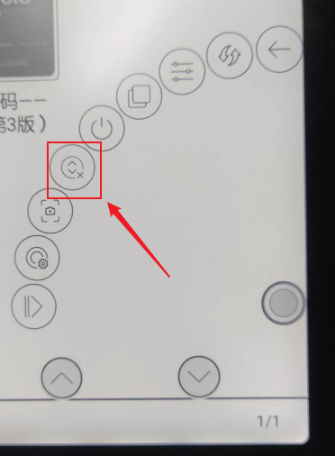
After you set it in once it works with other books. This also works with Google Playbooks.If still does not work, please disable the "Scrolling Buttons" in the Navigation ball and try again.
 0
0
請登入寫評論。
評論
2 條評論