BT physical keyboard ignores SPANISH layout

-
正式評論

Dear customer,
In this case, please connect your Note Air 5 C to the external physical keyboard first. Then, you could try to go to Settings > More Settings > Physical Keyboard > Keyboard Layout > Add keyboard layout > enable Spanish. Then, please select the Spanish keyboard layout. After that, please check if the problem can be fixed. -
I followed your instructions carefully word by word. IT does NOT WORK. English layout seems to be fixed no matter which option I enable.
After check that it did not work:- Again I tried to change keyboards (AOSP and ONYX).
- And for each one I tried to change layout (from English to Spanish and from Spanish to English).
No matter which keyboard or layout is selected. Everytime i push 'ñ' in my physical keyboard, ";" is shown in screen. "ñ" works fine with the ONYX screen keyboard, but not with bluetooth physical keyboard. English seems to be fixed and layout selection is show in screen but is simply ignored by a text editor program.
As I said this external bluetooth keyboard works fine with Spanish layout in a mobile with Android 13 and also in an iPad, but not with Boox Note Air 5 C with Android 15 , firmware versión 2025-12-05_14-39_4.1.2-rel_1205_da3fc7661 (not new updates available).
Please, could you provide a solution? Looking forward to check one that works.
Thanks.0 -
Dear customer,
Thank you for your reply and we apologize for the inconvenience. Due to certain changes in Android 15, switching to the Spanish layout is currently unavailable. Our development team has already been assigned to address and fix this issue. As a temporary workaround, you can use Gboard to enable the Spanish layout. Please follow the steps below:
1. Install Gboard.
2. Go to the system Settings → More Settings → Language & Input Method → Check the box for "Gboard".
3. After enabling Gboard, tap "Gboard" to enter its settings. Then, connect your Bluetooth keyboard. Once connected, the "Physical Keyboard" option will appear in Gboard settings. Tap it, select "Languages", add "Español", and return to the previous menu.
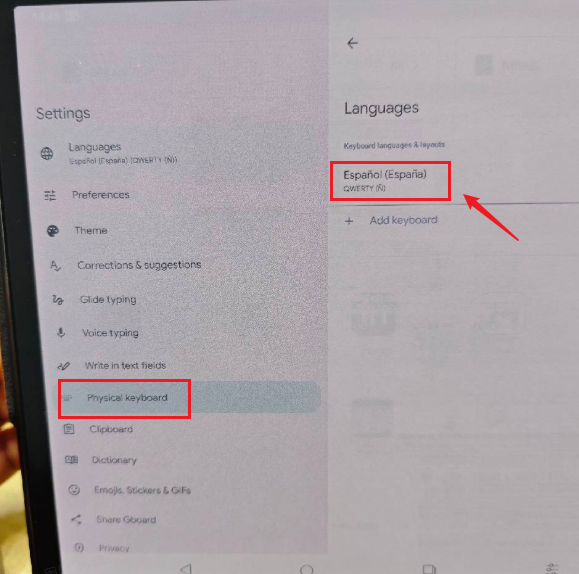
4. Tap "System Physical Keyboard Settings" → Select the name of your connected physical keyboard → Under Gboard Layout, choose "Español". Then, scroll down in the physical keyboard layout list and select "Spanish".
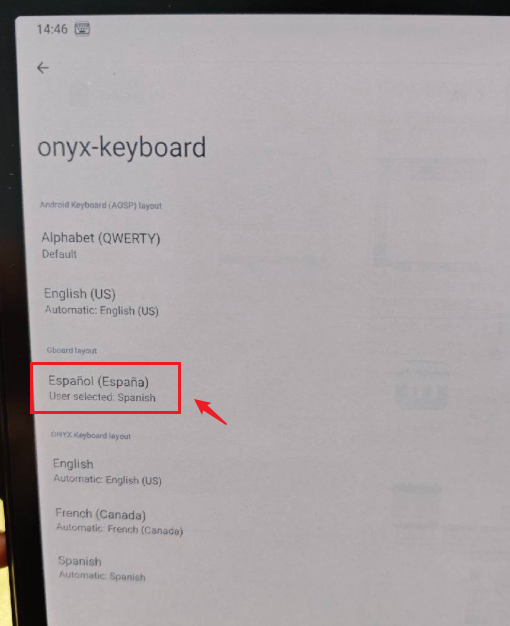
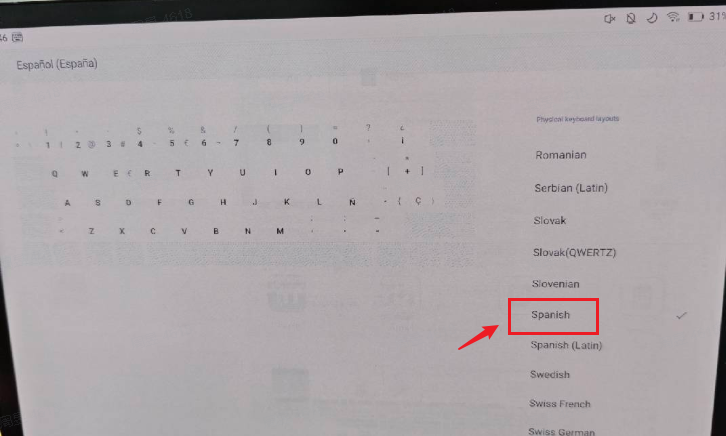
Once configured, your physical keyboard will function with the Spanish layout.
0
請登入寫評論。
評論
3 條評論