[Feature reqeuest] Select multiple items in library

Hi
I read many PDFs and after some while I want to "clean" the libary and move or delete most of them. However, I can only select one item at a time. It would be very useful to be able to select multiple items and then delte or move them. In Booxdrop you can select multiple items, but not a whole folder to copy to the PC, which also makes synchronisation more difficult. If this could be added to future versions, it would be much appreciated.
Thanks!
-

Dear customer, we apologize for the inconvenience.
The library actually has a feature to select and remove files. To do that, you could click on the book logo on the top left first, and then click on the checkbox icon.
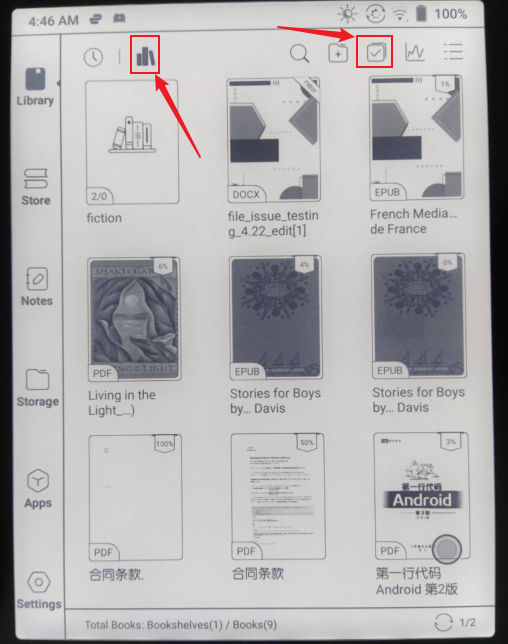
After that, you will into a selection mode. And then, you could start selecting files and delete them.
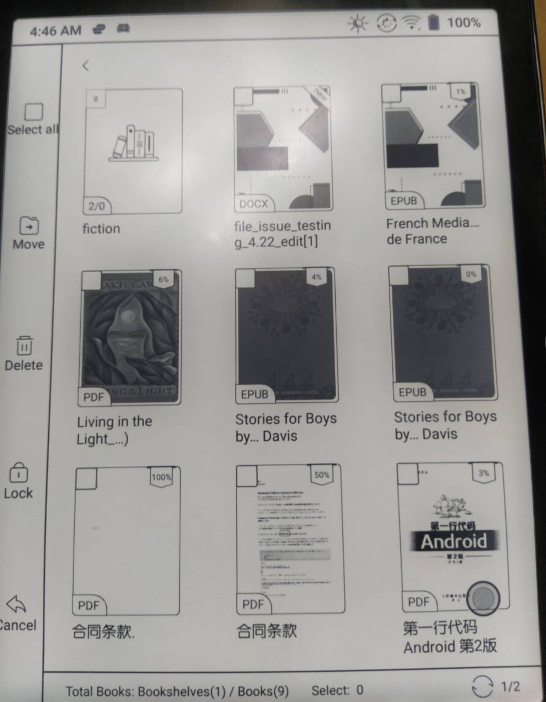
Many thanks for your time and hope it helps.
0
請登入寫評論。
評論
1 條評論