If you turn off Enable Floating Toolbar on Neoreader you loose possibility to control that app

I've noticed that if the floating toolbar is disabled I can't control the app (no touch control, no toolbar available, no neoreader menu). The only solution is clear its storage in device settings (please remember you will lose all annotations in your books!!!)
Does anyone with Noter 3 can confirm the issue? Don't try if you don't want to lose you annotiations and library settings.
-

Dear customer, we apologize for the inconvenience.
It is possible to enable the floating toolbar again without clearing the storage of the device. In this case, you could follow the steps below:

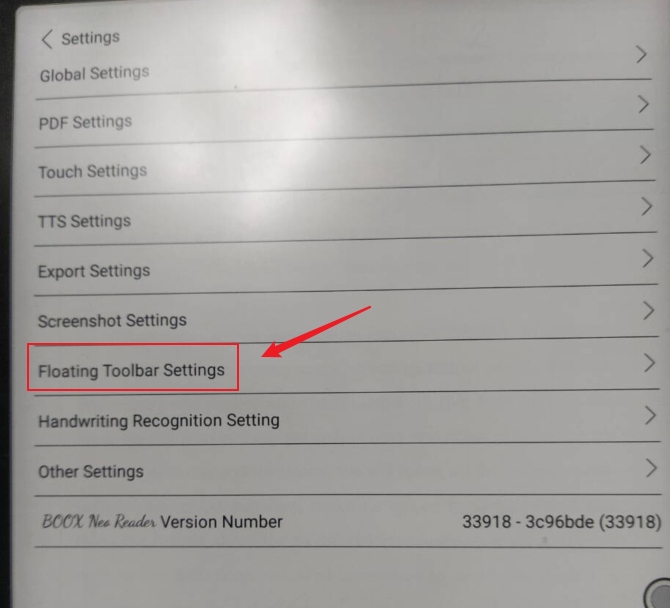
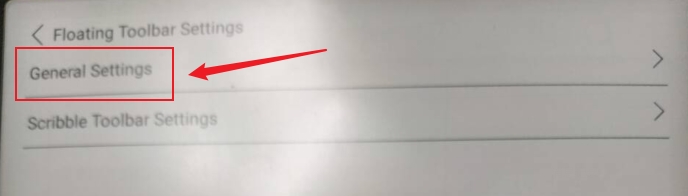
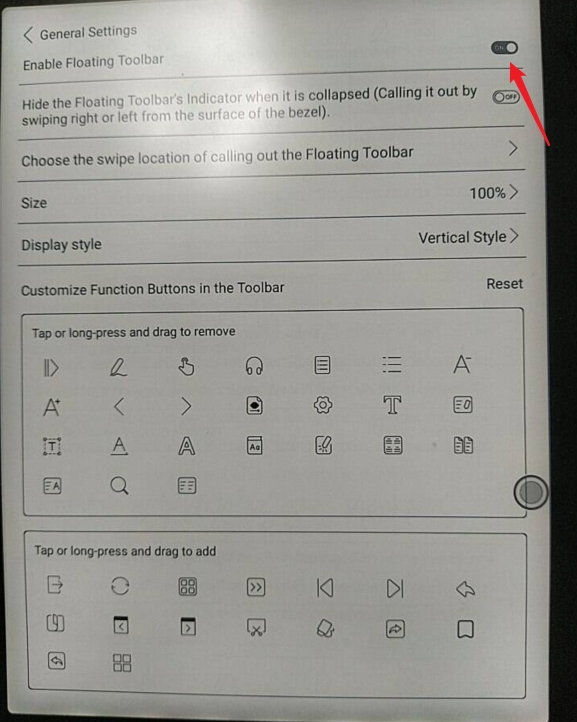
After that, the floating toolbar will display again on the NeoReader.Many thanks for your time and understanding.
0 -
Thanks for your advice but it is not a solution in that case. As I mentioned in that issue there is no touch control in Neoreader app only. It means I can't even scroll the pages. From the same reason I can't get into the app settings!
However the touch control is enabled in Onyx system, so I can get into system drop-down panel and any other app works fine with touch.
I think the problem is with the vanishing touch control in Neoreader app.
0 -
SOLVED
I found there are similar complaints on reddit
https://www.reddit.com/r/Onyx_Boox/comments/s52vec/cant_open_floating_toolbar_back/
https://www.reddit.com/r/Onyx_Boox/comments/tz6dia/neoreader_unable_to_turn_page_and_bring_up_the/
https://www.reddit.com/r/Onyx_Boox/comments/jf5dcd/issue_with_floating_tool_bar_on_note_air/Fortunately there is also a solution (the last link) from 2 years ago!!! The issue still exists in the latest release. The vanishing touch control in Neoreader is connected with Gesture Manager - Bottom (Swipe up from the bottom border) turned on.
If you disalbe floating toolbar in Neoreader you have no touch control in that app at all.Please fix this issue in a future app update.
0 -
Dear customer, we apologize for the inconvenience.
Even if the touch is disabled, you could still use the stylus to tap on the center of the page to get to the settings of the NeoReader.
We appreciate your suggestions and we will forward your suggestions to our tech team and improve the software of our products.
Many thanks for your effort and understanding.
0
Please sign in to leave a comment.
Comments
4 comments