neo reader pdf right to left page turn setting

-
Official comment

Dear customer,
We apologize for the inconvenience.In this case, please kindly update the firmware of your device to the latest version first. You could update the firmware via "Settings" > "Firmware Update" on your device. After that, please follow the steps below to change the NeoReader settings.
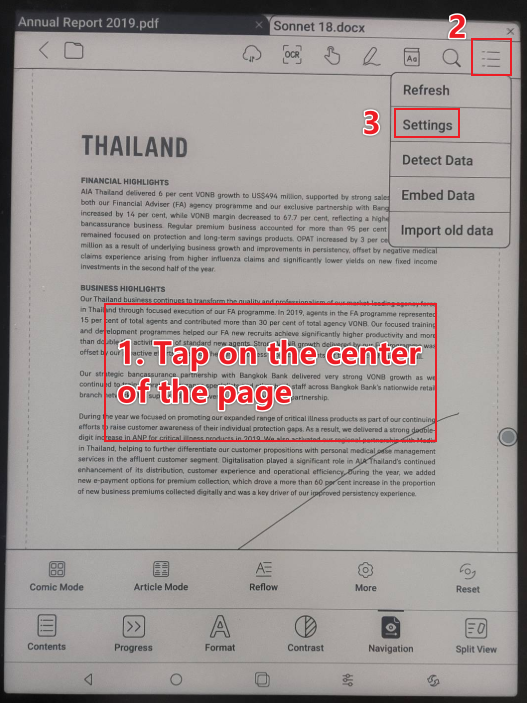
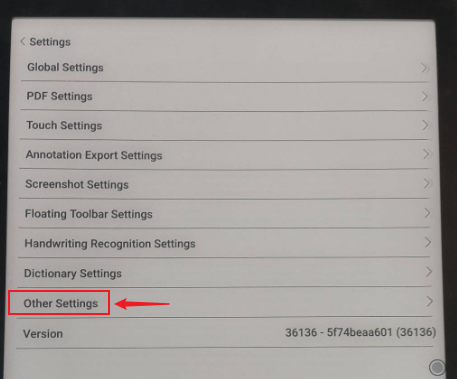
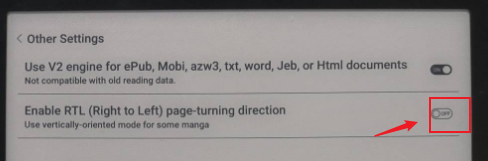
And then, please check whether it is possible to fix the problem.
Many thanks for your time and understanding.
Sincerely,
Derek -
The arrow key also doesn't switch RTL for pdf. right arrow key flip to next page but it should be previous page in Right To Left mode.
0 -
Upgraded to the latest 3.5 beta. The same issue. I do have Enable RTL checked.
I have a custom touch area setting where lower left is prev page, lower right is next page. (x = nothing, S = setting, M = menu, < = prev page, > = next page)
xSx
xMx
<M>
When reading vertical Chinese PDF, lower left is stil prev page and lower right is still next page.
The proper behavior should be the reversed.
0 -
Dear customer,
We apologize for the inconvenience.
In this case, we suggest reproducing this issue on your device. After that, please immediately submit feedback via "Settings" > "Feedback" > "+" on your device. Please make sure that you tick the option "send logs" while sending the Feedback so that we can analyze and diagnose the exact problem better. Our technical team will reply to you as soon as possible after you submit the Feedback.
Many thanks for your effort and understanding.
Sincerely,
Derek0
Please sign in to leave a comment.
Comments
4 comments