Max lumi update 2023.04.20 changed page number to percentage, how can we change it back?

In the 2023.04.20 update for Max Lumi, the reading progress only show percentage instead of page numbers. This is useless as the progress bar is already showing a rough position in total, why remove the page number?
Without a page number, user have no way to know the remaining "20%" is 20 pages or 200 pages. I checked everywhere and didn't find a setting can change this back.
I don't know why will this update change this and remove the important information.
-
Official comment

Dear customer,
We apologize for the inconvenience.
In this case, please open the book in the library and please follow the steps below to change the settings. After that, please check whether the problem can be fixed.
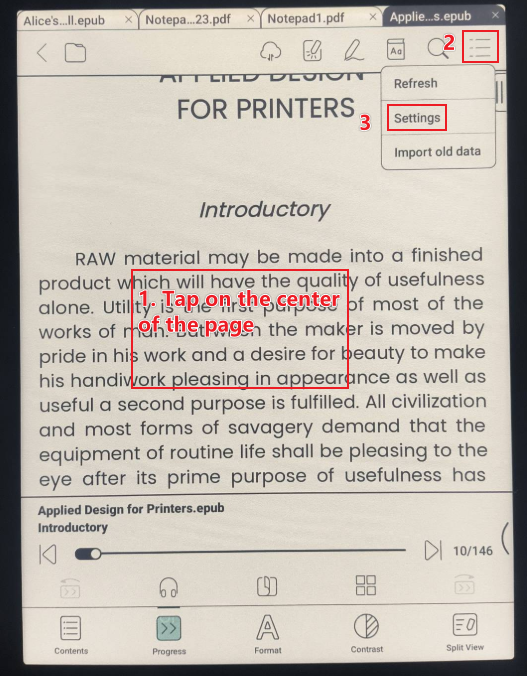
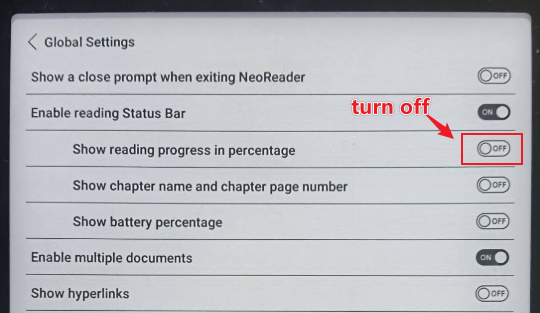
Many thanks for your time and understanding.
Sincerely.
Derek -
Thanks for the help!
The setting mentioned above is for reading status bar at bottom of page, while what I asked is the progress display when you click page center(just like the first screenshot you posted). I usually disable the reading status bar.
However, after I turned off that percentage setting in reading status bar, then disable the reading status bar, the progress display also switched to page numbers!
This solved my problem, thanks!
0
Please sign in to leave a comment.
Comments
2 comments