PDF Dictionay - Can't find dictionary

I am runnig NoteAir3C with the 2023-10-25_10-28 version. The problem is that I get "install dictionary first" error every time I pick a word regardless of the dictionary order (Onyx > EnglishDict > Online). I have the EnglishDict installed in the dictionary app as well. Any inputs from any one?
-
Official comment

Dear customer,
We apologize for the inconvenience.
In this case, we suggest clearing the storage and cache of NeoReader. After that, please check whether the problem persists. Below are the steps: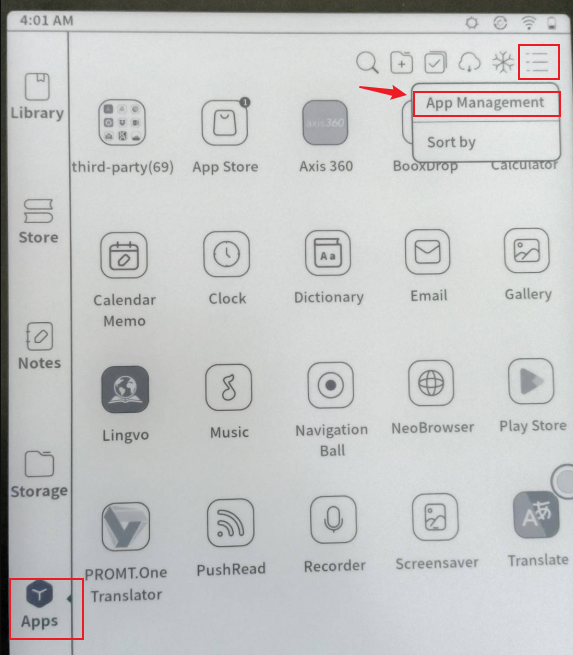
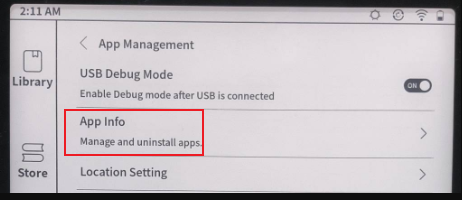
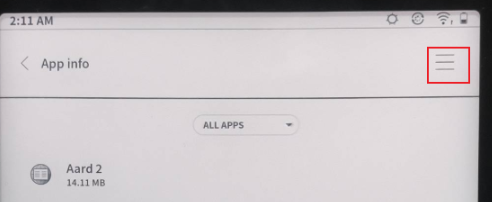
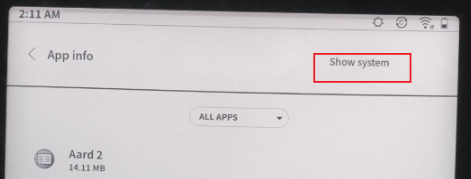

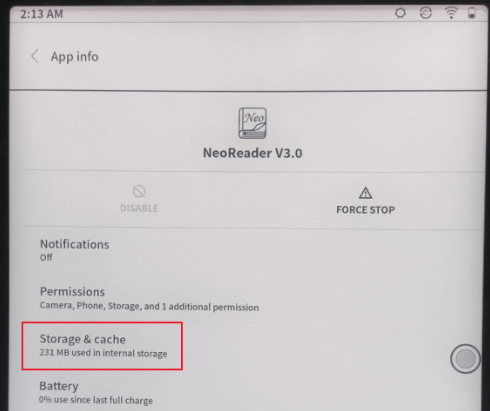
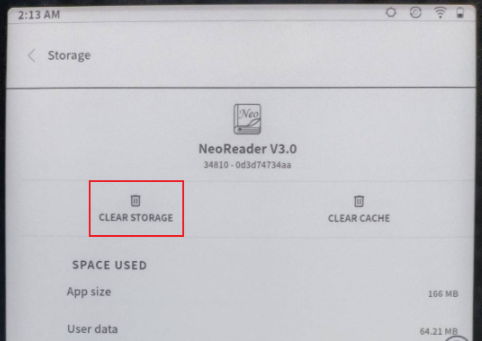
If still unable to fix the problem, we suggest reproducing this issue on your device. After that, please immediately submit feedback via "Settings" > "Feedback" > "+" on your device. Please make sure that you tick the option "send logs" and please describe the question in the feedback. Our technical team will reply to you as soon as possible after you submit the Feedback.
Many thanks for your effort and understanding.
Sincerely,
Derek -

The dictionary files for use with the Boox devices are in a standard format for dictionaries, but are not .PDF files. If you’ve copied in a .PDF dictionary, it will not work and you’ll get the messages that you are seeing,
0 -
I haven't uploaded a custom dictionary; I am using the built-in ones and still getting the error.
0 -
Derek, clearing the storage fixed it! Thanks a lot. The one tiny note; when the storage is cleared, it clears the cache, so one needs to pick the ebooks from sources (in my case they are in a cloud drive). Thanks again.
0 -
Derek, by the way, after few days, the error persisted again. It seems like the clearing the cache did not constantly fix it. I am not sure what's causing it, since I have not changed any dictionary settings, but I started to get the same error.
0
Please sign in to leave a comment.
Comments
5 comments