apps drawer

Hi,
I can't find the App Drawer or Apps on my Boox Tab X. Those things are readily available on other devices running Android 11. Where are they?
Thanks
-
Official comment

Dear customer
You can find all apps from the Home page of Tab X. You can go to the Home page by clicking the Home button from the navigation ball or navigation bar.
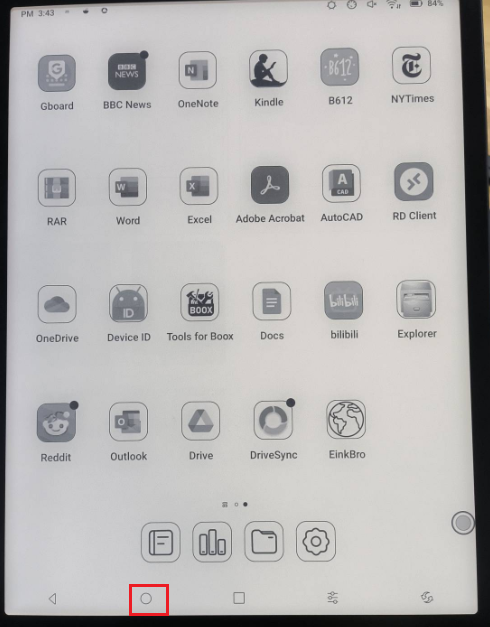
Many thanks for your time and understanding.
-
Thanks for replying. I know how to go to the home screen. That was NOT my question.
0 -
Dear customer,
Thank you for your reply and we apologize for the inconvenience. In this case, we suggest applying for the beta test via Settings > Firmware Update > Apply for Beta test. After that, please update the firmware to version 4.0 and check if the problem can be fixed.If the problem persists, we appreciate it if you could reproduce this issue on your device. After that, please immediately submit feedback via "Settings" > "FAQ & Feedback" > "+" on your device. Please make sure that you tick the option "send logs" and please describe the question in the feedback. Our technical team will get back to you as soon as possible after you submit the Feedback. Many thanks for your understanding.
0 -
Please, can you be more specific? Are you saying that the App Drawer will be available with firmware ver.4? I didn't know the app drawer depended on the firmware.
0 -
Dear customer,
We are sorry that we may misunderstood your question. We thought the App Drawer you were referring to was an app on Google Play called "App Drawer", instead of the feature of the Android phone.
In this case, we would like to confirm if the "App Drawer" you mentioned is the one in the picture below:
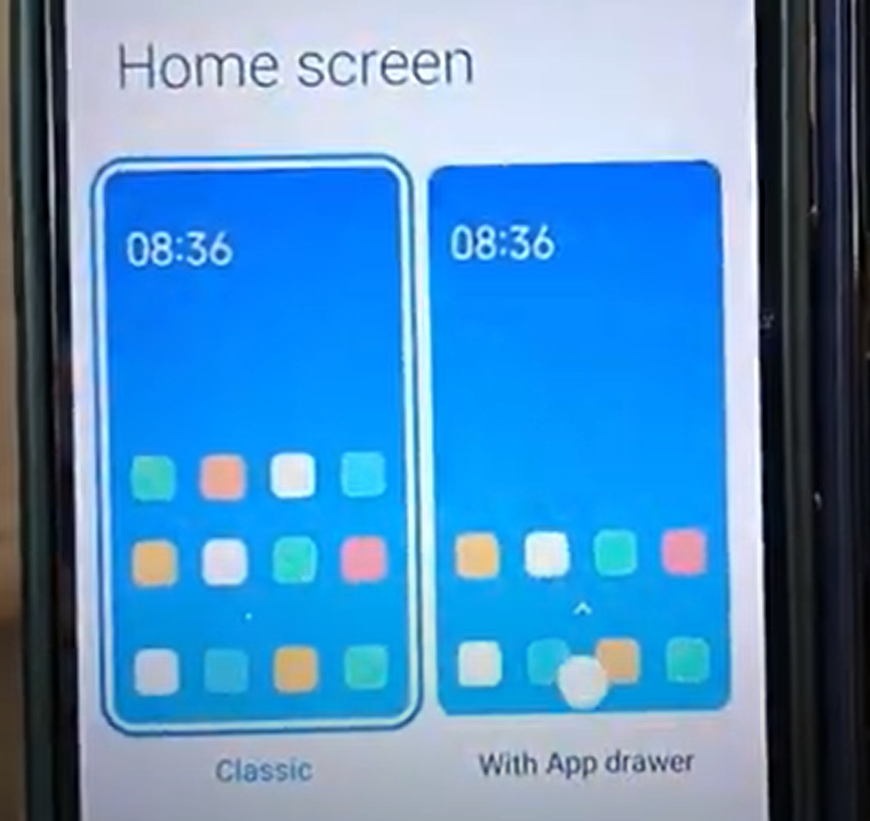
If this is the case, we are afraid that Tab X does not support this feature. Many thanks for your understanding.
0 -
No, it doesn't need to be a dedicated app as you see on google play. On any Android phone, if you swipe from the bottom side up you get a list of all installed apps no matter if they are on the home screen or not. That is the feature I was asking about.
0 -

OK , it seems all apps are always in the home screen, There is no other list oft Apps AS we habe in Android, i was searching fortheicon oft an APP i am using but Gould not find it in home screen. I FOUND IT! The APP was in a group (subfolder). Now the challenger was to möge the APP out oft the group Ingo the home screen , you habe to : REMOVE THE APP FROM THE GROUP ,,, after that the APP Spears back in home screen
0
Please sign in to leave a comment.
Comments
7 comments