v4.0 NovaAir2 Template feature much worse

After updating to the newest version, 4.0, the Notes Template feature is completely broken for me. I've made a multi-page template with a pdf and in previous version, when I pressed Page+ or the forward button on the Smart Cover, it inserted the next page in the template and after the last template page it started from the beginning.
Now it only creates a blank page when i press the Page+ button or Smart Cover button. Only the first page in the template is inserted and all other pages are blank. When pressing the Page+ software button it lets me choose pages from different templates but it only adds blank pages unless I choose a preinstalled 1 page template. If I use the Smart Cover button it always adds blank pages.
I also tried creating a note by using From Local File and I chose the pdf file I made. That creates a note with all pages from the pdf but again, after the last page when pressing Page+, it only creates blank pages. Also, when I use the pen the lines are incredibly thin and nothing happens when I try to change the size so using the From Local File function is completely useless.
So I cant use the tablet for planning and note-taking anymore. This is the main reason why I bought it so I'm not happy with the situation. Can I revert to previous version? Or can you fix the note app so it works like previously?
Thank you.
-

Dear customer,
We are sincerely sorry that the BOOX device does not support downgrading the firmware to the previous version.
Regarding the issue with the notes template, we are afraid it is unable to automatically change the template when adding a new page in the notepad. However, you can still set a template for the new page by clicking the "template" icon on the toolbar.
In the previous firmware, it is unable to apply both the customs template and system template in one notepad. Therefore, we made an adjustment in the firmware 4.0 and it is able to apply multiple templates in one notepad now.
We have forwarded your feedback to the related department and we will do our best to improve the software of our device. We highly appreciate your understanding!
0 -
If you make big changes between versions you should at least make it possible to downgrade!
In the current firmware 4.0 it might be possible to use system templates together with custom templates but my multi-page custom template doesn't work.
This is what I want:
- Activate my multi-page template
- Either load every single page or one page at the time
- Be able to write with the stylus on every page
At the moment this doesn't work. Previous version was perfect, the new one made it completely unusable.1 -
Dear customer,
We apologize for the inconvenience. It is possible to use the multi-page template in the Notes app. You can open a notepad > click the "Template" icon on the toolbar > Customs > Add > find the template file > select all pages in the template file. After that, you can set a page of the template file to be the template for the notepad.
When you need to add a new page to the notepad, you can click the "Page" button on the toolbar to add a new page and set a different page of template for the new page.
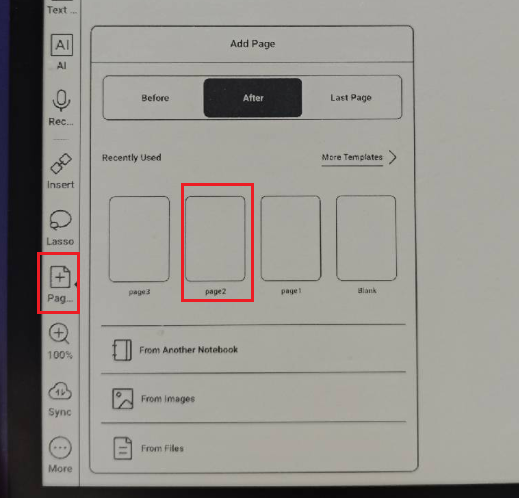
Many thanks for your understanding.
0
Please sign in to leave a comment.
Comments
3 comments