Tapping to AI and to different shapes also in notes

I like the new feature that you can double tap handwritten shapes for AI and different shapes in neoreader. I would love to have this feature in the notes app. I would also like a simple way to change font size. Currently it's always much large than the handwritten text
-
Official comment

Hello Johan,
Thanks for your post.
In this case, you can find the font size setting at the toolbar above as the capture below. And you can choose the font size you need.
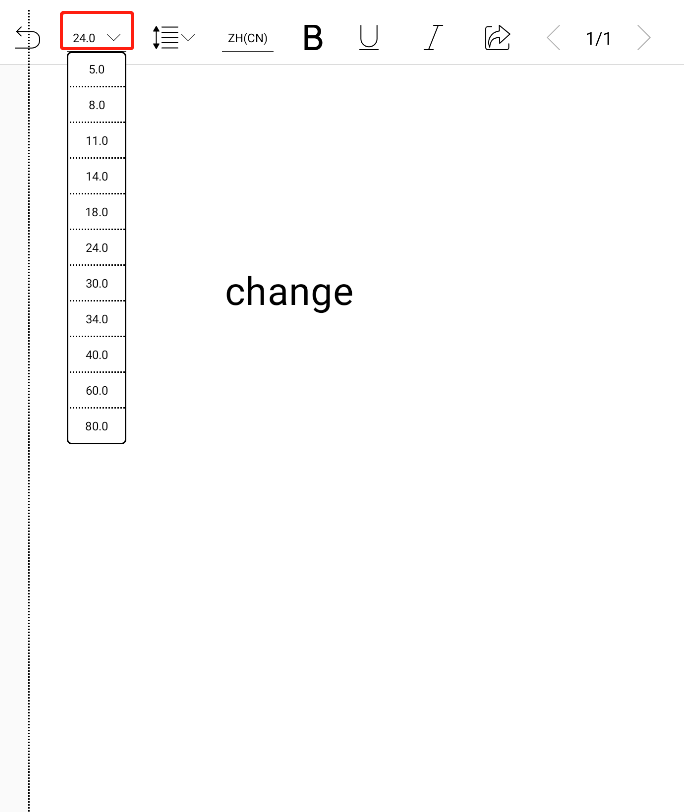
Thank you for your attention.
-
Those options doesn't show up in neoreader when I double-tap a handwritten text to convert it to typed text. My problem is that the text is always much bigger than the handwritten text which is annoying. It should rather be the other way around since it's easier to read small typed text than small handwritten text.
Meanwhile, the main point with my post is that I want the double-tap function to also work in notes
1
Please sign in to leave a comment.
Comments
2 comments