Exporting highlighted text

H!
I am choosing between the Boox Nova 3 and the Note 3. It is really important that when I highlight text, I can export the highlighted text into a format where I can see all my highlights in one place, and can copy and paste from that into a word document/to OneNote. Basically something similar to the read.amazon.com/notebook feature. Do the boox nova 3 and note 3 both provide this? I know the note 3 provides something like this (shown here: https://www.youtube.com/watch?v=LlwpwPlYnKE&ab_channel=MyDeepGuide). But I couldn't find any information on if this works for the Nova 3 as well.
Any help appreciated!
-

Hi Louise! I have a Nova2 and I can confirm, you can highlight and export, both saving your modified file on dropbox and even exporting only highlighted text on a new file, see the attached picture (then you can find your notes in a Note folder subfolder, named after the book)
I suppose you have the same feature on Nova3 ;)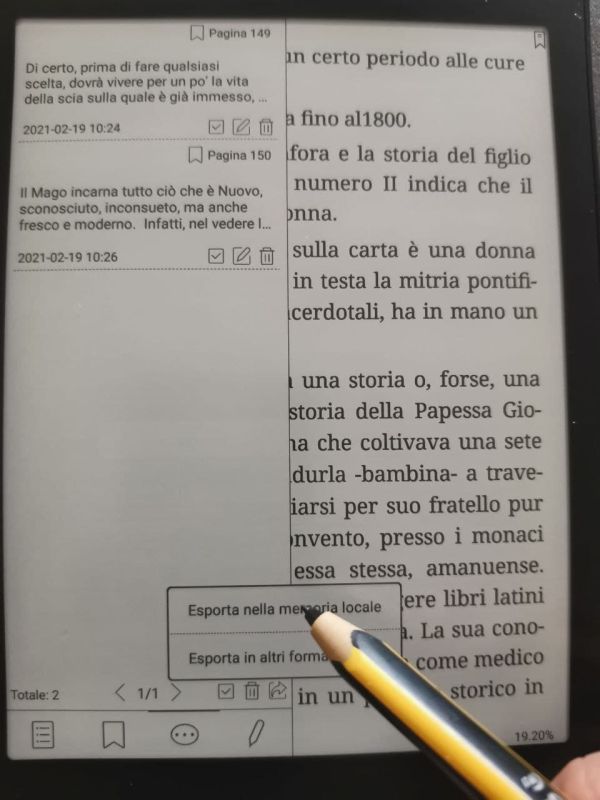
...and thank you for the link, I discovered some features that I didn't know :D
cheers, v.
0
Please sign in to leave a comment.
Comments
1 comment