Tab x AI smart shaping recognition does not work since last update

Hello, the AI function for shape recognition does not work anymore since the latest update. For example, you cannot drow a straight box around text anymore. It is super annoying. When will you provide an update?
-
Official comment

Dear customer,
We apologize for the inconvenience. In this case, we are wondering if the problem occurs on the NeoReader or the Notes app.
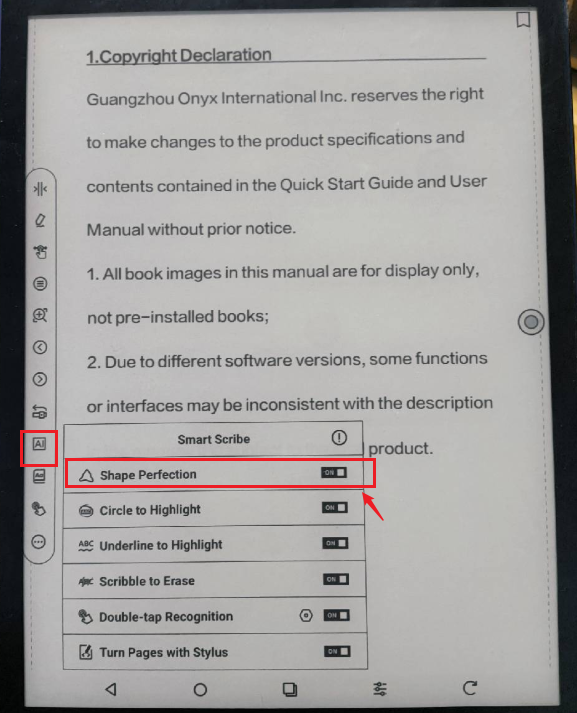
If the problem occurs on the NeoReader, you can follow the steps below to enable Shape Perfection. After that, please check if the problem can be fixed.
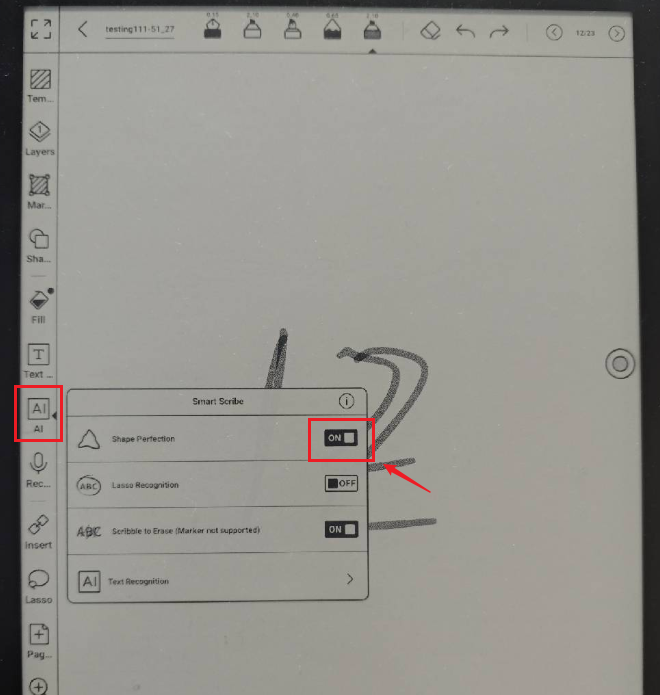
If the problem occurs on the Notes app, you can follow the steps below to enable Shape Perfection. Then, please check if it works.
If the problem persists, we would appreciate it if you could reproduce this issue and take a video to record the problem. Then, please send us the video by submitting a request via the link below:
https://help.boox.com/hc/en-us/requests/new
Our customer service team will check for the problem and reply to you as soon as they can. Many thanks for your effort and understanding.
-
It’s on the Tab X since the latest update. Shape perfection became completely unreliable. Just test it. Wrote a text and try to create a box around it. It will not recognize it, does partially, or nothing at all.
0 -
Dear Customer,
We apologize for the inconvenience. Upon checking, our tech team is aware of this issue and they will fix it in subsequent firmware versions.In this case, we would appreciate it if you could kindly wait for the new firmware. You could also apply for a beta test via Settings > Firmware Update > Apply for beta test. After that, our tech team will send you the beta firmware when it is available. Many thanks for your understanding.
0
Please sign in to leave a comment.
Comments
3 comments