Note Max: How to save files from BooxDrop to custom templates?

Hi there, have been following these instructions: https://help.boox.com/hc/en-us/articles/8569504200596-Transfer-with-Your-Computer
My uploaded custom template is in the Receive tab of BooxDrop but I can't save it to the device or choose it when trying to add a custom template (there's nothing in /Documents, /Download, /Push or /Scan etc).
Does anyone know how to get files out of BooxDrop and onto your device so you can actually use them?
Any help much appreciated.
Cheers, Ben
-
Official comment

Dear customer,
We apologize for the inconvenience. After you upload the file to the BOOXDrop, you can follow the steps below to download the file on your Note Max.
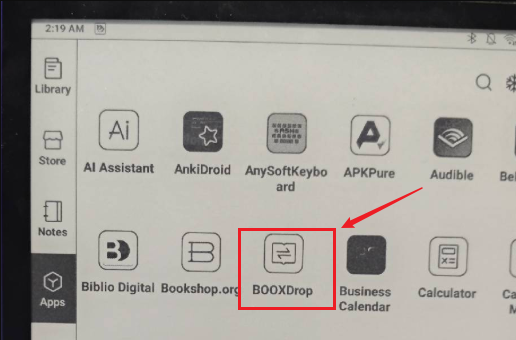
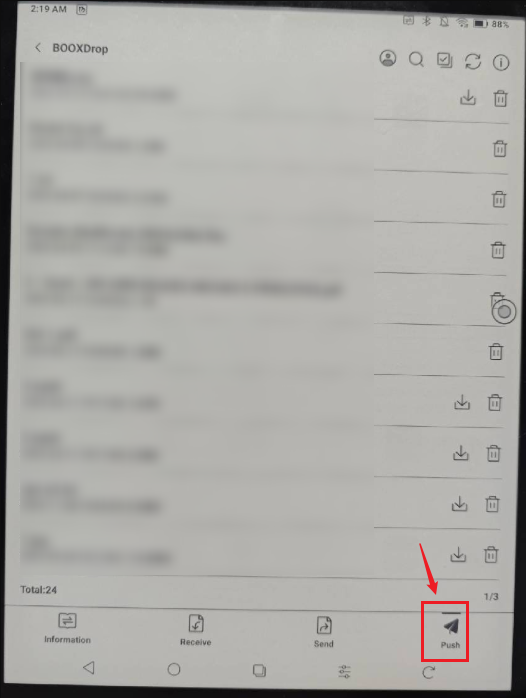
To learn more about transferring files between your computer and BOOX device, please check the video at the link below:
Many thanks for your time and understanding.
-
The video is like all the other help docs and doesn't explain how to get files using push - so thank you for explaining.
0
Please sign in to leave a comment.
Comments
2 comments