Go Color 7 (Gen II) - Mapping buttons to tap/swipe

Hello,
I recently got a Go Color 7 (Gen II) and have a couple of reading apps that don't support volume key page-turning (e.g., Ameba manga).
I've already tried the standard "Page-turning" / "Scrolling" option in the "Customize Buttons" settings, but it unfortunately doesn't work for these specific apps.
Is there another app or a setting that lets you map a physical button press to a screen tap or swipe? I'd love to be able to use the buttons to turn pages. Any suggestions?
(I've tried Key Mapper, Button Mapper, Macrodroid, but none of them seemed to work...)
-
Official comment

Dear customer,
We apologize for the inconvenience. If the app does not support turning pages with volume control or scrolling, we are afraid that this app does not support turning pages by using the side buttons. -
Thanks for your reply,
I have a quick follow-up question: Are there any plans to allow button presses to be mapped to screen taps or swipe gestures in a future update?
This would enable us to make the physical buttons work for page-turning in any app, even those that don't normally support it.
1 -
Dear customer,
We have forwarded your suggestion to the relevant department. We are afraid that we are currently unable to provide information on when this feature will be supported. However, we will do our best to improve the software of our device in the future. Many thanks for your understanding.0 -

Gotta say that I'm super disappointed by this. I got my Go 7 in the mail today and it turns out that none of my regular reading apps support this. I was totally convinced that it was a universal thing – that the buttons on my e-reader would work like they do on any other e-reader.
Selling something as an e-reader and mapping the two buttons to Volume screams "Oh, we can't deliver on page turns, we'll just make them control volume and blame the app makers for not customizing their smartphone apps for our little e-reader".
If there's no fix, I think this is going back.0 -
Hi Henrik,
We are sincerely sorry that the Go 7 currently does not support customizing the side buttons to make them do taps or swipe gestures. In this case, we have forwarded your suggestion to the relevant department.
In this case, you could try to customize the side buttons to make them the scrolling button. After that, please check if that works.
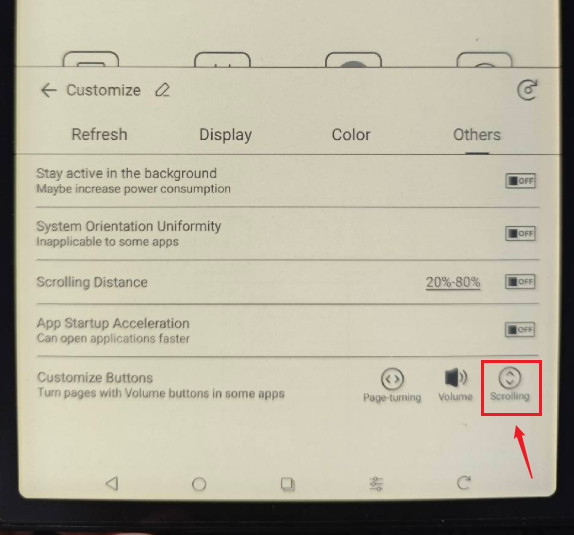 0
0 -

I've also been trying multiple apps to get this to work with my Go 7. It is absolutely wild that this is not a feature.
Kind of seems like an afterthought for the developers, but it's a big enough issue that I wouldn't recommend this device to anyone who needs to use a third party reading app.0
Please sign in to leave a comment.
Comments
6 comments