Ver 4.1 - Zoom function disappeared in neoreader

-
Official comment

Dear customer,
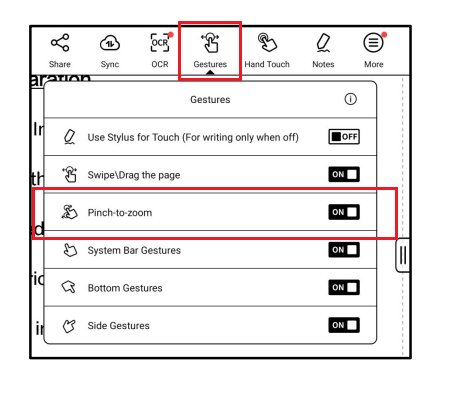
We apologize for the inconvenience. In this case, you can open the PDF and tap on the center of the page to bring up the menu > Gesture > enable "Pinch-to-zoom". After that, you can use 2 fingers to zoom in and out on the PDF.
-
Thanks for the reply! While this "Pinch-to-zoom" function technically provides the right font size for my Go 10.3, this way of zooming feels like just a makeshift. It is not as stable as the "+" and "-" zoom button as before, since enabling the "Pinch-to-zoom" function is susceptible to accidental dragging (floating on the pdf sheet).
For the next update, could it be possible to have the "+" and "-" zoom in/out button right through the Style - Zoom mode interface, as before? This function is a must-have for reading pdf articles. I would like to set a zoom level between the current options, "Fit to Screen"(which renders font too small), and "Fit to Width"(no margins, font too big).
Thank you so much!
0 -
Dear customer,
Thank you for your reply, and we apologize for the inconvenience. In this case, we have forwarded your suggestion to the relevant department and will do our best to improve the software on our device in the future. Many thanks for your understanding.0
Please sign in to leave a comment.
Comments
3 comments