New pages appear dark in some notes

-
Official comment

Dear customer,
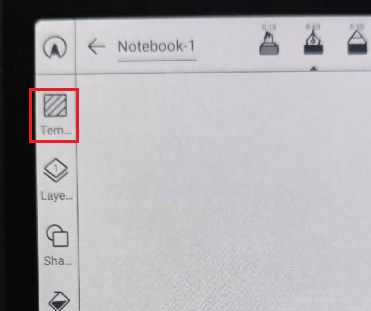
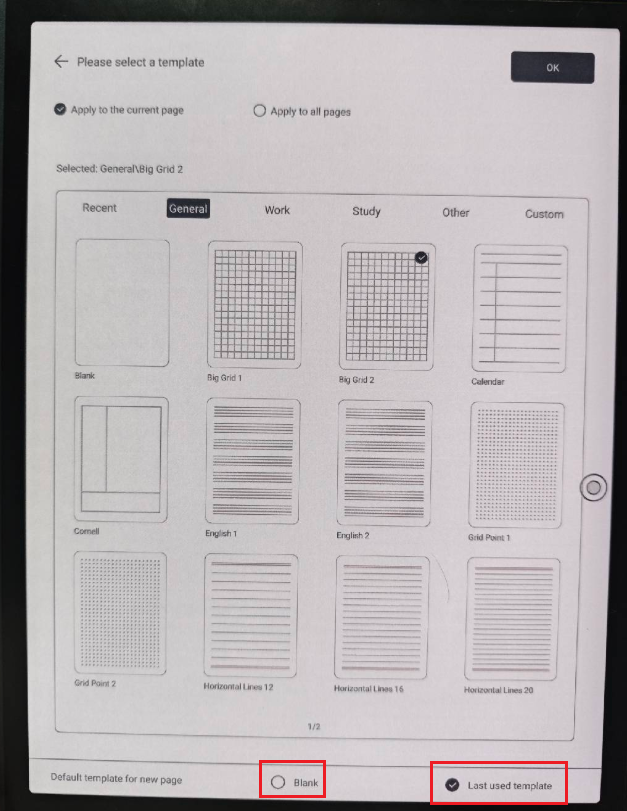
We apologize for the inconvenience. In this case, we suspect the problem is related to the template settings of your device. In this case, you can open a notebook > click "Template" on the toolbar > please select the blank page, and check if it is possible to change the template of your notebook. Also, you could choose whether the new page is a blank page or the last template you used. If you want the template of the newly created page to be the blank page every time you create it, you can select "blank" on default tempalte for new page. After that, please check if the problem can be fixed.
-
Hi Boox Service, thank you for getting back to me about this issue. I am pleased to report back that changing the page template has fixed the issue and I can now continue using my longer notes again. Many thanks for the accirate advice and good support.
I am still not sure how these pages started turning dark suddenly but if it happens again I now know how to remedy the situation. Cheers!0 -
Hi Rex,
We appreciate your feedback, and we are glad the problem is solved now. Please feel free to contact us anytime if you have any questions.0
Please sign in to leave a comment.
Comments
3 comments