What do the light color indicators mean on the Inksense Plus pen for the Palma 2 Pro?

What do the light color indicators mean on the Inksense Plus pen for the Palma 2 Pro?
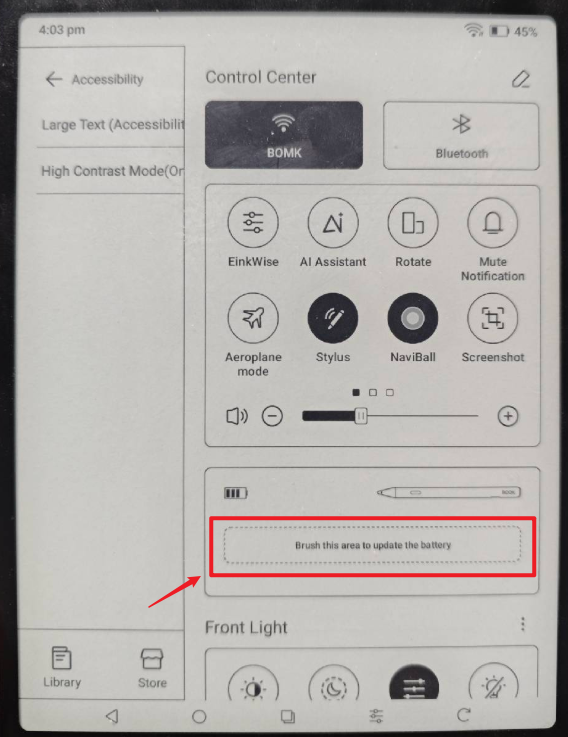
What color indicates charging versus fully charged? And how can I tell the current battery level?
Thanks.
-
Official comment

Dear customer,
When charging the pen, if the battery is between 0-99%, it indicates a red light. When the battery is 100%, it indicates a green light.To check the battery of the stylus, you could swipe down from the top right of the screen to bring up the Control Center > tap on the "Brush this area to update the battery".
-
Thanks for your response. I have a few more follow up questions:
1) How many hours of usage does the pen work for?2) What is the rough standby time of the pen (if I don't use the pen and it powers down, how long will the battery last)?
3) Is there a was you get a more precise estimate of the battery charge remaining besides the 4 bars (eg, a number rating)?
Thanks.
0 -
Dear customer,
Here are the answers to your questions
1) and 2) The Battery life of the Inksense Plus mainly depends on the usage. After fully charging the Inksense Plus, it can normally last for 4-5 days.
3) We are afraid that there is no other way to display the remaining battery power.
0
Please sign in to leave a comment.
Comments
3 comments