Boox Assistant App for PC

I am following this thread where Joyce asks how to transfer files between your Boox and other devices and it directs her to https://www.boox.com/boox-assistant/
So it just bounces to boox.com and I am lost. So, there is no boox assistant software for windows? This is also inferred in the Onyx Boox Youtube channel, specifically this video.
I did install it on my Android Phone, but all of my book files are on my pc.
0
-

Dear customer, we are sorry for the inconvenience.
If you would like to transfer files between your device and your PC, you could follow the instruction below:
1) Transfer file from BOOX device to PC- You need to log in to your Onyx account on both your device and the website https://push.boox.com. Then you could long-press a file and there will pop up a window. And then click "Share" and select "Onyx-Mail". After that, you could enter your email address and the file on the device will send it to your email. And you could open the email from your PC to download the file.
2) Transfer file from PC to your BOOX device- You might need to have an Onyx account first,then please log in to your Onyx account on the website: https://push.boox.com/
- Then could push(upload files on Onyx cloud)
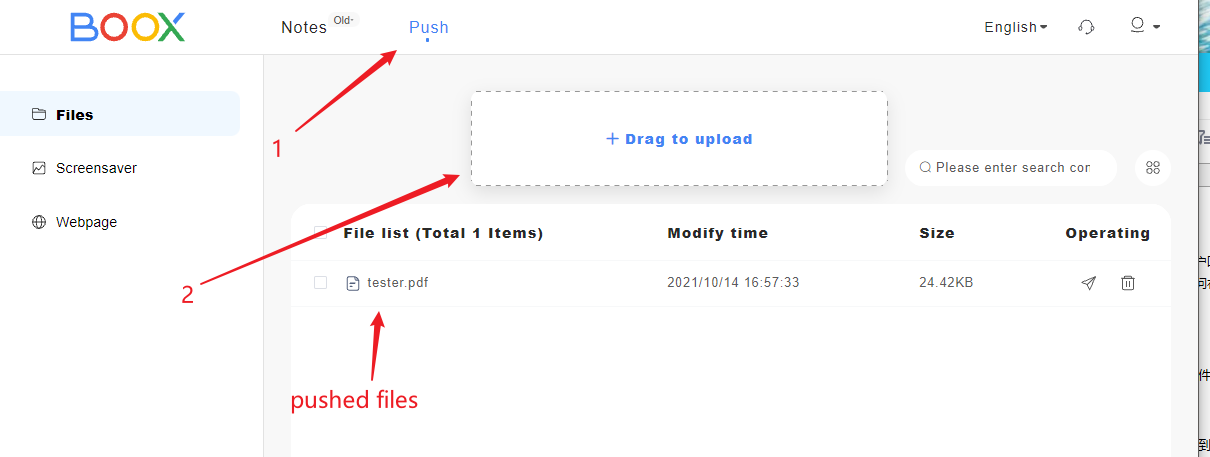
- Then please log in to your Onyx account on your BOOX device. And go to "Settings" → "Accounts" → "ONYX Account (Support all Sync and push functions)" → "Push" → "Push". And you could just download and open the file that was uploaded on the Onyx cloud.
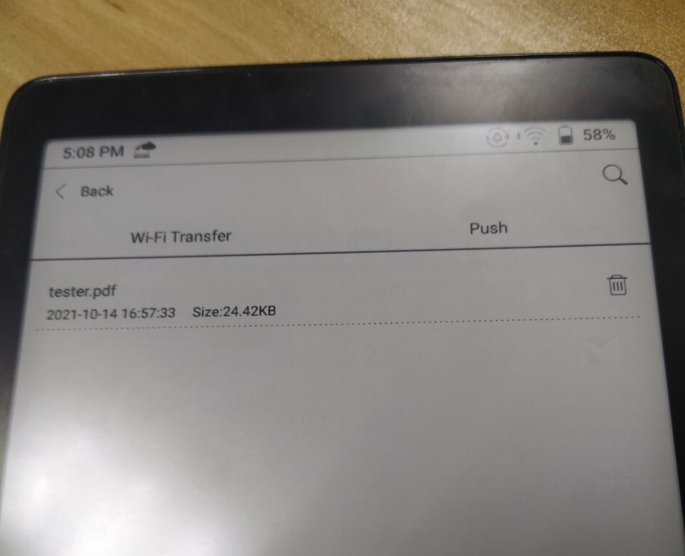
Thank you for your time and hope it helps.
0 -

is it a one way sync only?
0
Please sign in to leave a comment.
Comments
2 comments