problem with pdf´s since poke 3 last update

There used to be two ways of changing orientation: from within the reader and from the top bar .
The option of changing orientation disapeared from the neoreader since the update, now i can only change it form the top bar and is somewhat inconvinient because it changes the orientation for everything not just a file or the reader app, but thats not the main issue.
My main problem is that since the update, when i change the orientation pdf´s do not fill the screen horizontally the file borderline of the sides matching the end of the screen , as it did before the update. Now it remains filling the screen vertically, as it would when changing the orientation from the top bar before the update, and i have to press zoom 2 or 3 times and it is not exact and sometimes misses part of the text, almost nothing but it does.
To sum it up, before the update, when changing the orientation through the format options of the reader app the file would fill the screen to the sides without cropping the margins now the file borderline only matches the screen when set vertically and i can´t make it do that when set horizontally
-

Dear customer,
Thank you for contacting us and sorry for the inconvenience.We are sorry that you may need to change the pagination in order to make the page extend in full-screen size when under the landscape mode.
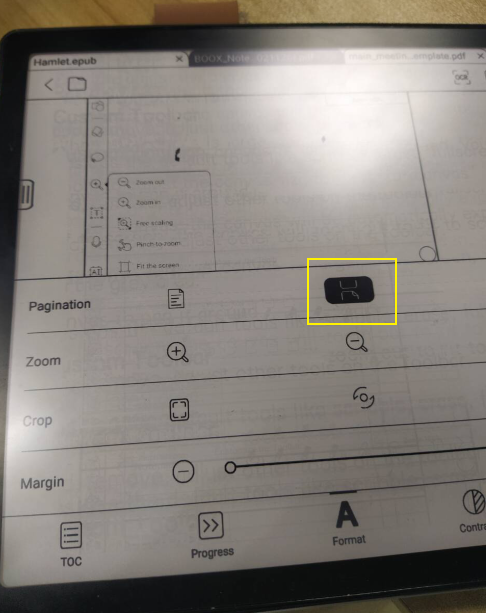
Thank you for your time and hope it helps.0
Please sign in to leave a comment.
Comments
1 comment