Cantonese Input

I don't see any good Cantonese input in the boox download store. In my past experience the Google Cantonese Input has always been the best input for Cantonese because it supports Yale input methods as well as other inputs like handwriting and voice to text. Please make it accessible in the Boox download eg Google Cantonese Input 1.5.4.164561151 https://www.apkmirror.com/?s=cantonese+input&post_type=app_release&searchtype=apk
Also request that Boox make the handwriting recognition compatible or speed up as there appears to be a screen lag when writing similar to other apps that don't have access to Boox's api.
Thanks,
Felix
-

Dear customer,
Thank you for contacting us and sorry for the inconvenience.
After checking, the invoice input feature of the Onyx Keyboard input method is support Cantonese. You could set this Cantonese as the voice input language via the steps below:
1) Add a text box in a notepad and click the gear icon in the picture below: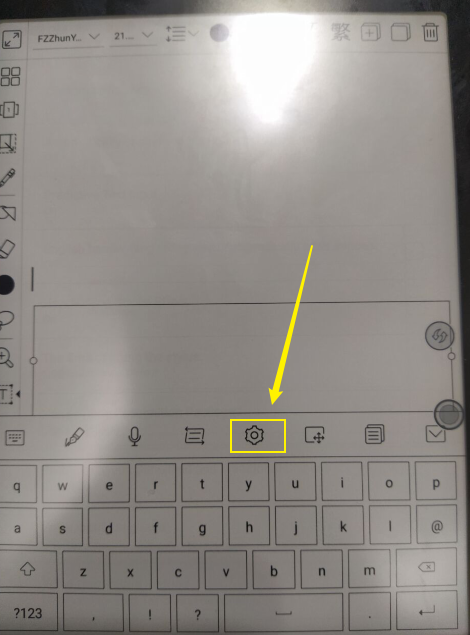
2)Find the option "Voice Input Language", and select Cantonese as the voice input language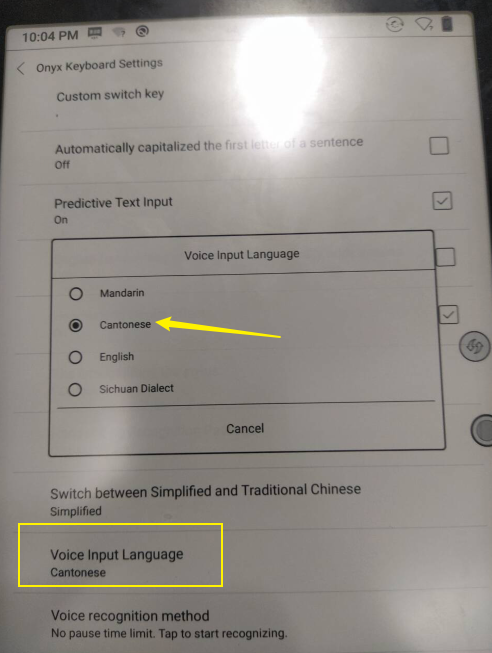
We have also recorded your suggestion of speeding up the feature of handwriting recognition. We will do our best to improve our products.Many thanks for your feedback and understanding.
0 -

I have just purchased a Tab Mini C, I have the same problem, I cannot use the cantonese voice input, I cannot find the setting as you mentioned, can you advice how to use cantonese as voice input in Onyx keyboard?
Thank you.
0 -
Dear Joe,
We apologize for the inconvenience.
We are sorry that the Onyx keyboard is no longer able to recognize Cantonese. In this case, you can download Gboard from Google Play and use Gboard for voice recognition.
Many thanks for your time and understanding.
Sincerely,
Derek0
Please sign in to leave a comment.
Comments
3 comments