NeoReader unusable

Hello,
I have a bit of a problem for which I can't seem to find a solution.
In NeoReader, I had disabled the finger touch, and I don't remember disabling the toolbar but it isn't there anymore anyways.
I don't think I have a single way to open the menu anymore. I can't slide to the side to open the toolbar, and I can't tap in the center to open the menu, so I'm just stuck on the page and the only thing I can do is draw, and I can't erase anything.
Please help
-
On top of that, I could not access settings to enable the toolbar, or do anything else.
This was solved by going into Settings > Version > NeoReader V3.0 > Storage and cache > Clear Storage.
Then going into the library settings > Refresh library.
Thank you to the agent who helped me solve it
1 -

Dear customer,
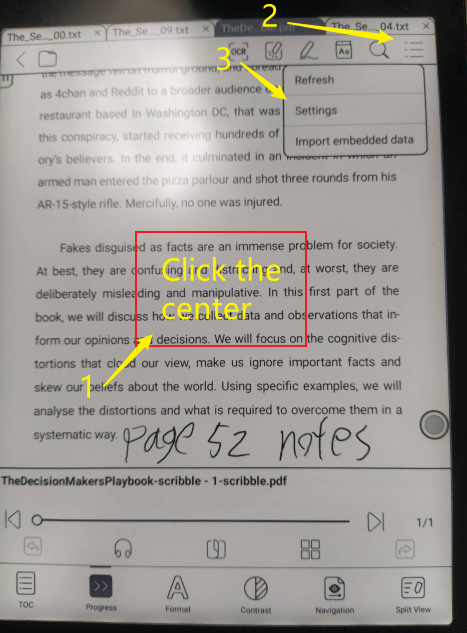
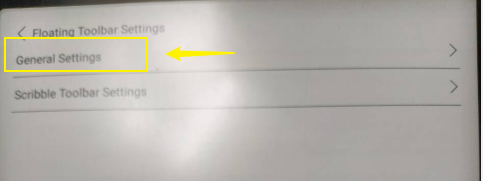
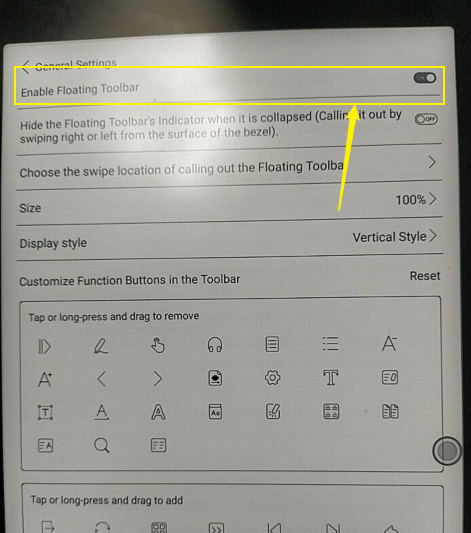
In this case, you could enable the floating toolbar by the steps below:
1)
2)
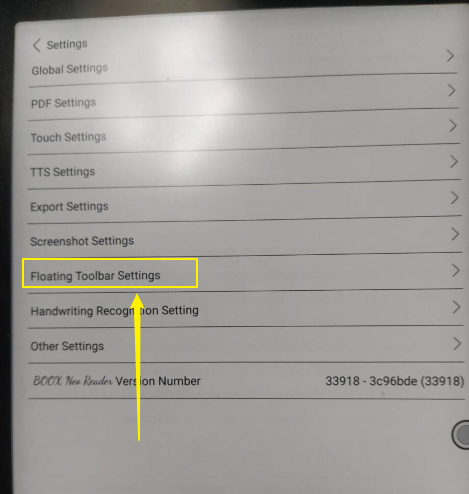
3)
4)
BOOX Shop Support Team0
Please sign in to leave a comment.
Comments
2 comments