Arrows on screen won't go go away, regardless of what I do

I am a newcomer to my lovely NA5C, and to Boox in general. Things have been fine (after a few rocky days of figuring my way around) then all of a sudden these two irritating up and down arrows showed up on my screen 2 days ago - and you may have seen this on Reddit yesterday.
I can't figure out how to turn them off. I did look at the Navi-ball settings, and it makes no difference whether I've pinned those arrows or not...except when I DO pin them, then they stay and another little double arrow button shows on the screen.
I have even removed those arrows as an option in the Navi-ball settings, no joy, they are still there.
It is a large distraction to have them there, is there another way of getting rid of them? I've looked at various posts here, and the advice is always to pin them in settings. That however, just causes even more buttons to be pinned. What else can I try that I have missed?
There has to be a way to fix it, but how?
-
Official comment

Dear customer,
In this case, you can try to tap the navigation ball and click the icon in the picture below to disable the scrolling buttons.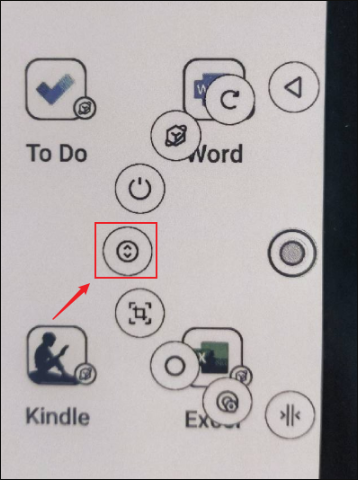
Then, please check if the problem can be fixed.
Please sign in to leave a comment.
Comments
1 comment