Changed Lasso Paste Workflow

Recently the workflow for lasso copy paste changed. If a change is made to an existing function the user should not have to search the help forums to enable a function that previously worked. Please add tool tips to any changes in existing functions that break after an update.
The help forum solutions provided by the Boox tech support were limited to the specific users model ( i.e. Boox Note) and did not apply to the MaxiLumi2. In addition to address the requesting users specific question the tech support responses should include a reference link to resolving the issue for all models. For example the screen shot provided for enabling long press gestures did not match the MaxiLumi2. Not options for enabling long presses is available at all on the MaxiLumi2. Through trial and error I determined that long presses that are now required to paste Lasso content MUST be done with a finger and not with the stylus. The previous workflow exclusively used the stylus.
Please consider my comments when modifying existing functions for the devices. Upgrades that break existing function and workflow is a major pain point as is blocks the user from accomplishing their scheduled task and instead having to search community support blogs to used their device again and complete their work.
Thank you for your consideration,
B. Wells
-
Official comment

Dear customer,
Thank you for your feedback, and we apologize for the inconvenience. In this case, we have forwarded your suggestion to the relevant department and will do our best to improve the software on our device in the future. -

I'm also on a MaxLumi2 device. Long-press is not enabled for fingers, and I have _no_ idea how to enable it. The proper setting cannot be found in settings (MaxLumi2 does not have "gesture settings" in the settings menu).
Without the ability to paste my boox device is pretty much useless, and I have not been able to make use of it for two weeks now.
Can someone please tell me how to paste something or enable the long-press?
0 -
Hi Rutger,
In this case, you could try to enable the Tap/Long Press via the steps below.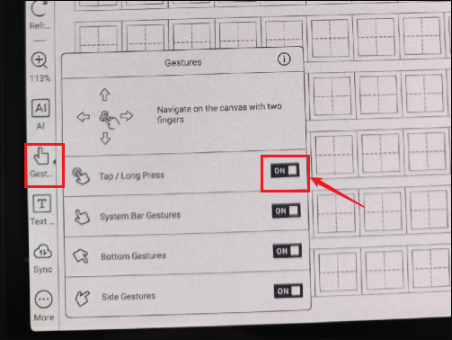
After that, please try to use your finger to long-press the page and see if it is possible to bring up the paste button.0
Please sign in to leave a comment.
Comments
3 comments