using a Note for presentation - problems

Hello,
playing around with using a Note Air 2 for presentations I noticed that the screen (as seen by screen casting software (FDroid Screen Stream)) isn't updated until after 2 seconds after lifting the pen after drawing for a while. I.e., during the entire drawing time (+2 seconds) the screen image on my PC doesn't change, although of course the drawing is displayed on the Note. Is there a way to force the (internal) screen to be updated quicker so that screen casting is able to show live drawing?
Also, it would be useful for presentations to have a tracing pen mode that just shows where the pen touches the pad (with a trace) without drawing anything. Is this something we could see in future software updates?
Cheers
-

Dear customers, we apologize for the inconvenience.
In this case, we are wondering is it the delay on screencast only happens when drawing on the device or it also happens on turning pages or opening documents? If it is not only happening on drawing, the issue is probably about the WiFi or the software.
In this case, we suggest using the native screencast feature of the device which is on the top menu.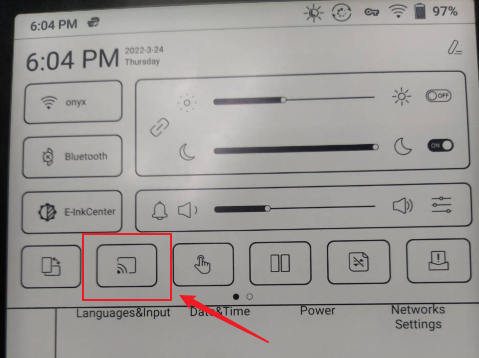
Or you could also try with another screen mirror apps like Spackdesk (for windows) or TeamViewer(for macOS)..
0 -
Thanks for your reply.
Screen Stream is very responsive for screen changes other than scribbling with the pen.
I have tried Teamviewer from my phone (because I am using Linux for which the Note's screen cast doesn't work), but it stated that the Note doesn't accept incoming connections. So perhaps something is wrong with my account setup.
Anyway, perhaps screen casting will work with Linux someday ;-)
0
Please sign in to leave a comment.
Comments
2 comments