Note titles: do they do anything?

You can title notebook pages. But does thst title do anything? Is it ever used?
Specifically:
In the notebook there is the "view multiple pages" view, which shows nine pages.
(selected by the first icon at top left)
Thst lets you move, copy export etc.
It also lets you title pages.
Thsat is handy to see within a notebook, but as far as I can tell thst title is never used anywhere.
Given thst it is text (not handwriting) - why not?
This could be used to annotate or title pages
-

Hello! We apologize for the confusion.
The feature of titling pages for notebooks is to manage the info after you have exported your notes to a PDF. Here is the situation that which the page title will be used:
1) I created three pages and put titles on each page.
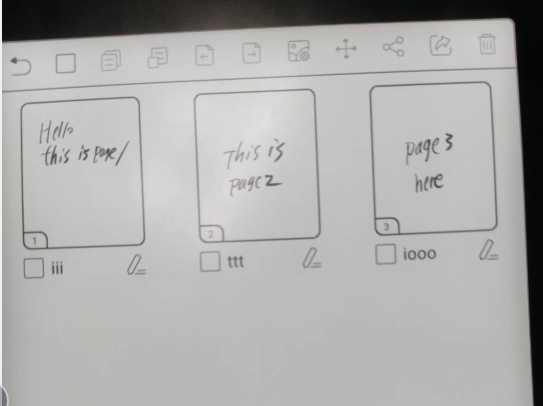
2) And then, I select all pages and export them to a PDF
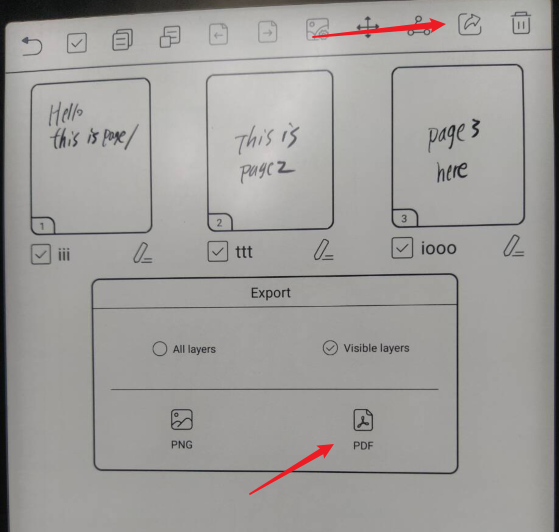
3)I opened the export PDF notes and I can see the page title on the bottom menu
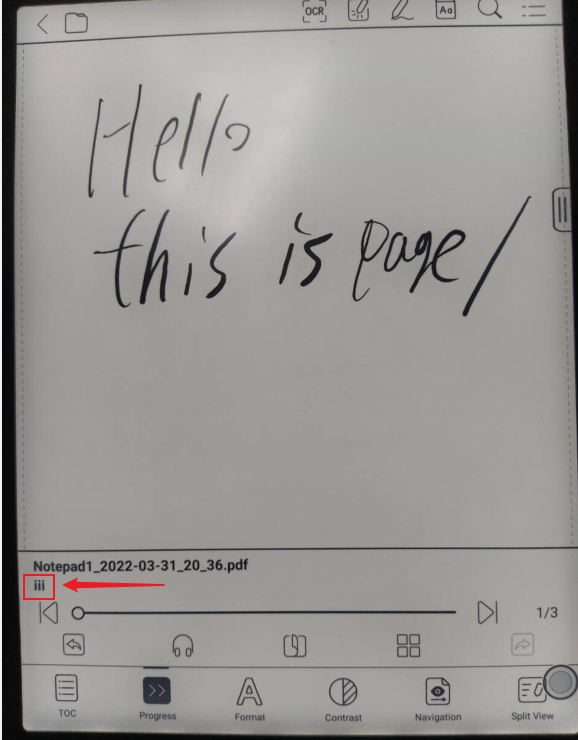
4) To see all pages titles, you could click the list icon on the toolbar


You could consider the page title to be a chapter name. When you exported your notes to PDF, the page titles will become chapter names on the list. So when you need to find specific info on a page in your exported PDF notes, you could check the list without opening each page in order to find the info that you need.
2 -

Thank you! This is helpful information. My feature request would be that the title be visible from within the page (for example next to the name of the notebook when the notebook is open). It would nice to be clickable so as to rename it without having to go to the thumbnail view. Thank you! :-)
0
Please sign in to leave a comment.
Comments
2 comments