unable to synx note to ONYX account

Does anyone have the same issue? I tried to sync my note to ONYX account, and it shows "ONYX sync failed; internal server error, please try later". Thanks
-

FYI folks, mine is working intermittently now
0 -

it still doesn't work for me.
1 -
working, but slowly / unreliably
0 -

Dear customers, we apologize for the inconvenience caused.
We received feedback from our tech team that a new EUR server is now available. For users in Europe, please select the EUR server on the device, and try if possible to sync notes again.
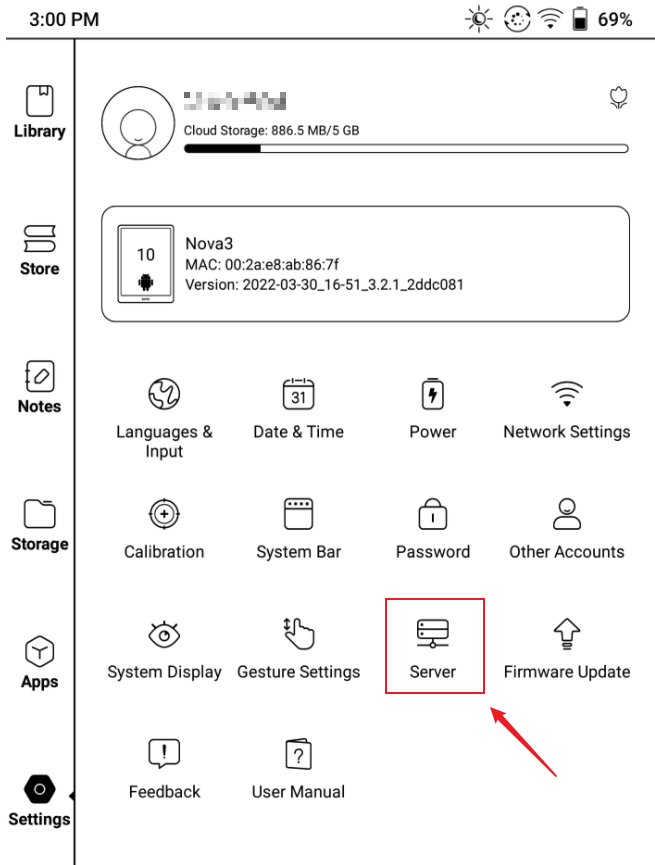
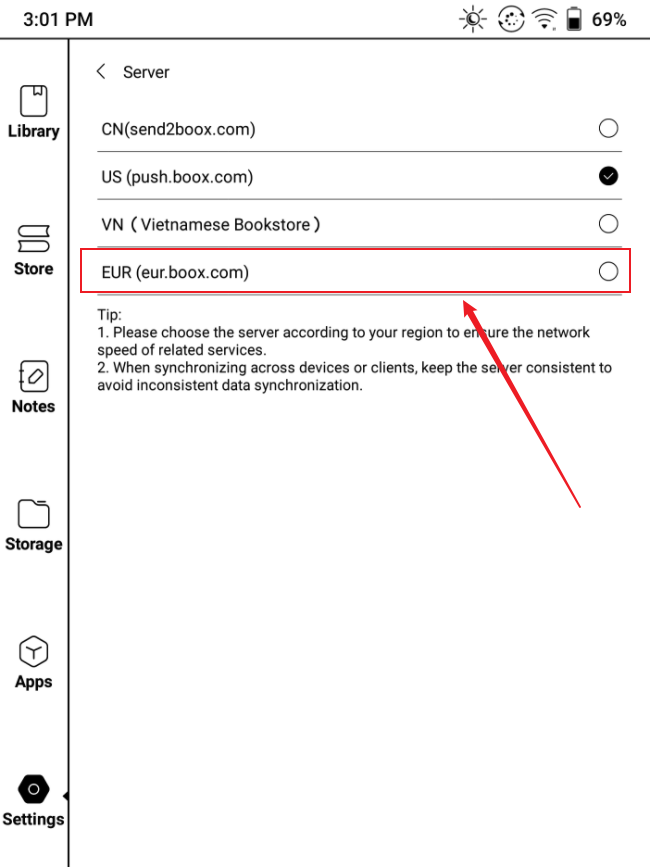
After you have switched to the EUR server and synced your notes, you could log in to your account on https://eur.boox.com/ and access your notes on the website.
0 -

EUR Server works perfect. Sync of Notes can now be done. For me the issue is solved. Thanks!
0 -

The notes I have created over the last two weeks are not appearing in push.boox.com even though they now look like they are sync-ing on the device. Should I switch to eur.boox.com ? I'm in Australia.
0 -
Hi Sharon, we apologize for the inconvenience
If push.boox.com is still unable to sync notes successfully, we suggest switching to eur.boox.com. The EU server also works in Australia.
Many thanks for your time and understanding.
0 -
Okay, so I followed the instructions for changing my NoteAir2 to eur.boox.com server. I presume I need to log in to the EUR server on my laptop now so that both the NoteAir2 and the laptop are signed into the same server. However, I can't see on my laptop where I should change servers. I tried signing out and signing in again on my laptop. But now in push.boox.com on my laptop, I don't see any files at all (previously it had all my files up to about 25th March 2022). What am I doing wrong?
0 -
Hi Sharon, we apologize for the inconvenience.
To view notes that are synced to the US server, please log in to the website: push.boox.com on your laptop.
To view notes that are synced to the EUR server, please log in to the website: https://eur.boox.com/ on your laptop.
After you have logged in to the EUR server website, you should be able to see your notes.
Many thanks for your time and understanding.
0 -
unable to synx note to ONYX account - again. What do I do this time?
0
Please sign in to leave a comment.
Comments
40 comments