Autocomplete when typing in the notes feature

I am using a Note Air running the 2022-04-27 firmware. I have a Bluetooth keyboard. I wanted to type in one of my notes. It worked for about five minutes. I seem to have accidentally turned on some sort of autocomplete feature. I cannot turn it off, and it makes typing unbelievably painful. I literally can't type the words "want" or "turn"--if I type "want ", it autocompletes it to "wanton". Please, please tell me how to turn this autocomplete feature off!
-

Dear customer, we apologize for the inconvenience.
In this case, please try to change the "AB" into "A" and see if the problem persisted.
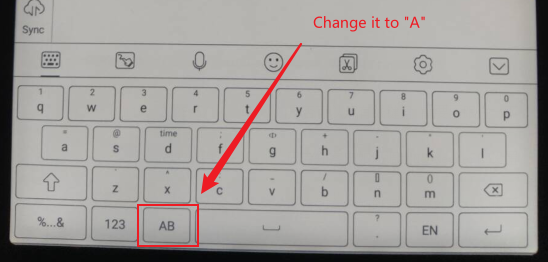
However, if the problem persisted, please try to switch the keyboard to the Android keyboard, or you could download a 3rd party keyboard such as Gboard. To switch the keyboard, please go to the "Settings" > "Languages & Input" > "Current Input Method"
Many thanks for your time and understanding.
0
Please sign in to leave a comment.
Comments
1 comment