"Enable Google Play" not available Note Air 2

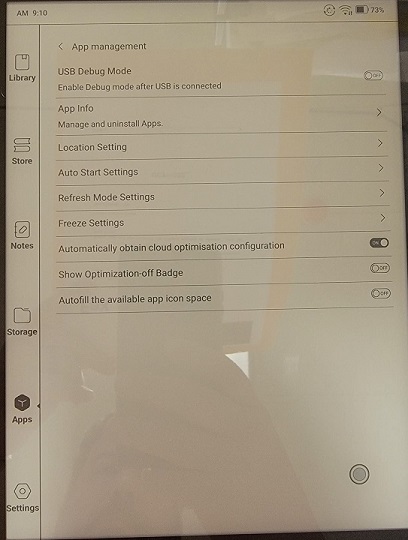
Just received my Note Air 2 and I'm not seeing the enable google play option in app management. Not finding anything in forum of google search. Device is updated to latest firmware.
Thanks for any guidance.
-

Dear customer, we apologize for the inconvenience.
Please go to App Management > App Info > find "ContentBrowser", click it > Storage & cache > clear storage. After that, please check if the google play can be displayed in the Apps section
Many thanks for your effort and understanding.
0 -

I am having the same problem but the solution listed above did not work. Could you provide any help?
0 -

I have a new Note Air 4c. When i set it up i was able to install and use Play Store. Now Play Store has stopped working. The only way that i can get to the App is using the Settings - Apps & Notifications - Play Store. There is no option there to enable Google Play. i have downloaded the APK App from the Boox Website but it fails to load. i get a message "App not installed as package appears to be invalid." What to do? Thankyou.
0 -
Hi Nicholas,
In this case, please update the firmware to the latest version first. You could update the firmware via "Settings" > "More Settings" > "System Update" on your device. Then, please check if the problem can be fixed.
If the firmware is already the latest but the problem persists, please try to clear the storage for the Onyx Launcher via Settings > Apps & Notifications > Applications > ONYX Launcher > Storage > Clear data. Then, please check if the proble can be fixed.
0
Please sign in to leave a comment.
Comments
4 comments