Cannot open exported (and annotated) PDFs

Hello,
Mac User.
I can export my annotated PDF but they are not openable with anything.
Definitely a BIG issue.
Any help?
-

I had trouble figuring out a way that works. I have a Boox Note 3. I was able to get annotate PDFs again this morning.
I updated to the latest firmware. I connect the tablet to my PC through USB. Open the WifiTransfer folder on the tablet though the PC filing system, and drop the PDF file there. I can open and annotate it with the Reader, then retrieve the file with the PC through the filing system.
Make sure it works with the PDF you want to annotate. I think the WifiTransfer folder is a leftover from a feature that was abandoned from a past firmware. Exporting annotated PDFs is very important and should be supported.
0 -
No, my problem is the other direction. I am not able open any annotated file which I exported FROM the Boox to my mac. I am able to export either the annotated and the un-annotated file, but I can open on the mac just the original (i.e. without annotations).
Note that the weights of the files are different, being the annotated heavier, meaning that annotations ARE there, but at the end of the day the final PDF is not openable by anything.
0 -
"No, my problem is the other direction. I am not able open any annotated file which I exported FROM the Boox to my mac."
What I meant is that the method I used to move the PDF from the computer to the tablet affected whether or not I could retrieve an annotated PDF. What I described above is a way of moving a PDF on and off the tablet, and retrieving an annotated PDF from the tablet.
0 -

Dear customer, we apologize for the inconvenience.
In this case, please check if the firmware version of your device is the latest. If not, please update the firmware. You could check it in the "Settings" > "Firmware update" > "Check for update".
With the latest firmware, it is able to copy or move a PDF from a BOOX device to a Windows PC by using a USB C cable. When viewing a PDF on PC, the annotations are visible. The software we used to open the PDF on PC is Adobe Acrobat DC, you could try opening the PDF with Adobe Acrobat DC or Reader and see if the problem persisted.
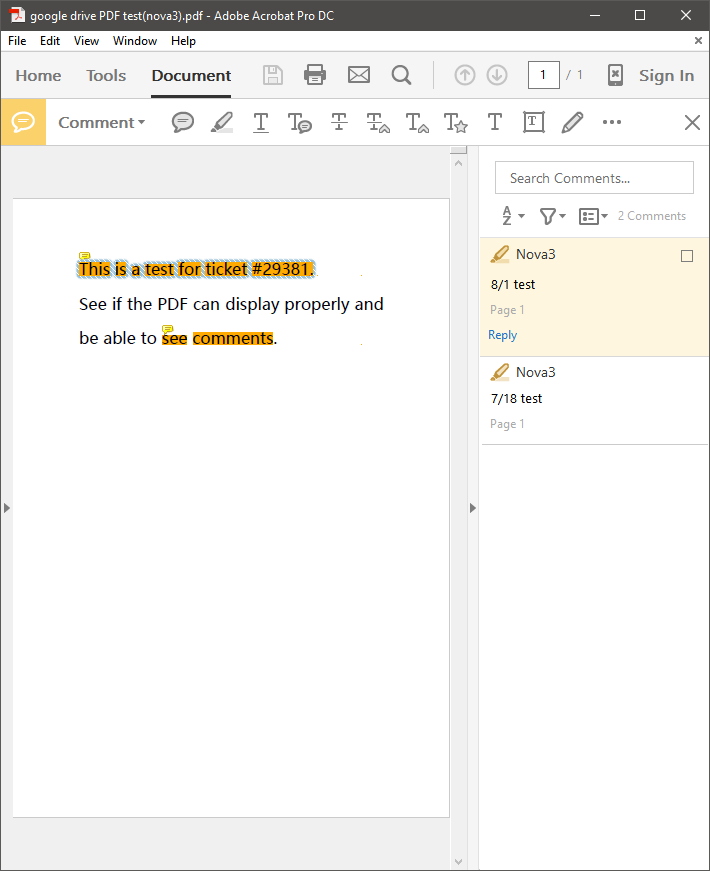
If the firmware is already the latest but the problem persisted. We suggest submitting feedback on "Settings" > "Feedback". Please make sure that you tick the option "send logs" while sending the Feedback so that we can analyze and diagnose the exact problem better. Our technical team will reply to you in 2 working days after you submit the Feedback.
Many thanks for your effort and understanding.
0
Please sign in to leave a comment.
Comments
4 comments