Note Air 2 Plus - Very sensitive palm rejection after update 3.3

After update 3.3 the screen became very sensitive to touch, as if palm rejection doesn't work (mostly in Neo Reader I think). I keep touching the screen while using the pen and it's extremely frustrating. Any suggestions how to solve this?
-

Also, with palm-rejection on, you would be able to swipe down from the top to change the settings, or from the button to exit the notes app. This is no longer possible when palm-rejection is turned on, and is kinda annoying when you have to switch between notes a lot.
0 -

Hi TY, we apologize for the inconvenience.
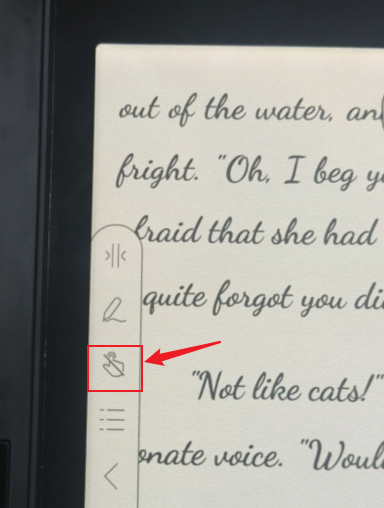
In this case, you might enable the global palm rejection so it is unable to call out the system menu with the gesture. To prevent this issue from happening in the NeoReader, you could only enable the palm-rejection for NeoReader by clicking the hand icon on the toolbar.
Or you could change the hand-touch settings so you could write on the NeoReader without worrying about touching the screen.
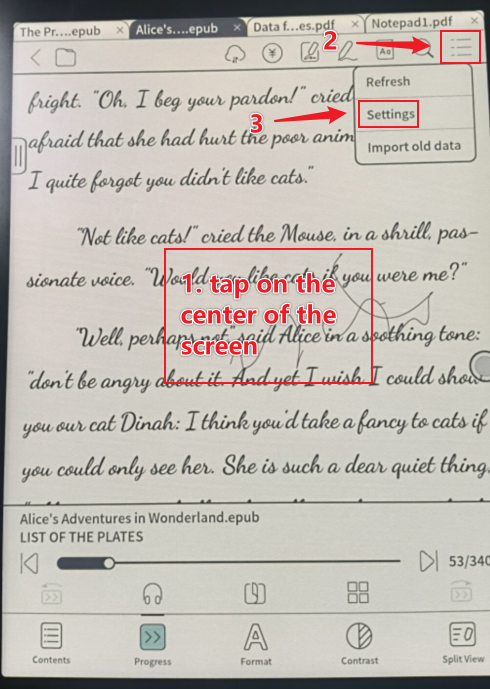
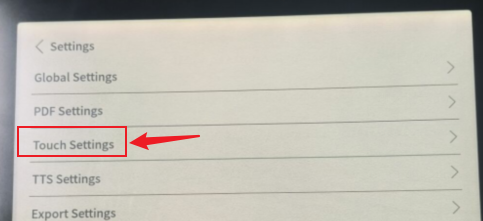
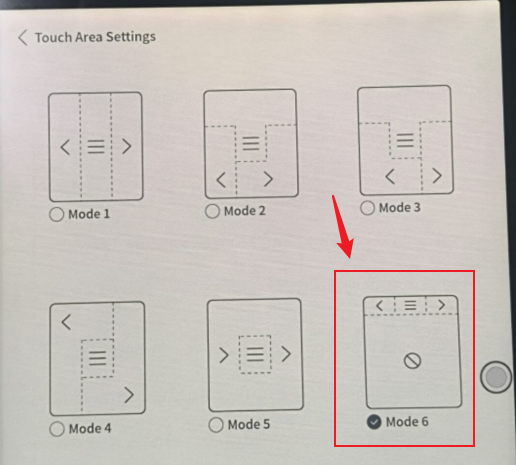
Many thanks for your time and understanding.
0 -
Hi Leon, we apologize for the inconvenience.
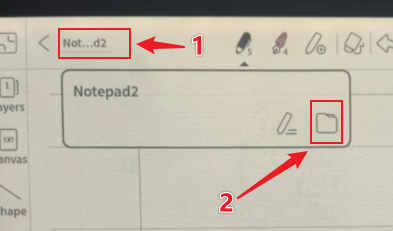
When turning on the palm-rejection setting in the notepad, you could still able to click on the icons on the toolbar. To switch to different notes, you could click on the title of your notepad and click the folder icon to switch to a different notepad without turning off the palm-rejection setting.
Many thanks for your time and understanding.0
Please sign in to leave a comment.
Comments
3 comments