Device Stuck in Endless Boot Loop: Reset Attempts Unsuccessful (BOOX Go Color 7 Gen II)

Hello BOOX Support Team,
I am requesting technical assistance for my BOOX Go Color 7 (Gen II), which is currently stuck in an endless boot cycle and cannot be used.
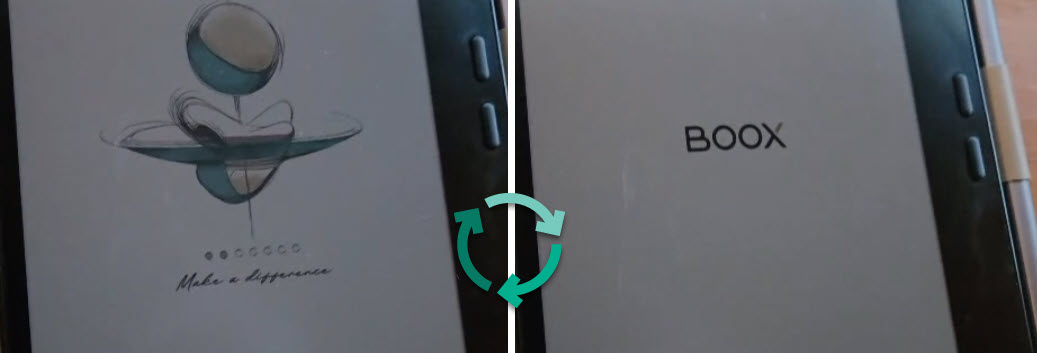
Problem Description
When powering on the device, the BOOX boot screen appears and begins loading. As the loading animation progresses, the device consistently resets when it reaches the third dot on the boot screen. The device then restarts and repeats this process indefinitely. It never reaches the home screen or completes startup.
Troubleshooting Steps Already Attempted
I have tried the following without success:
-
Forced restart by holding the power button for 10–20+ seconds
-
Multiple reboot attempts while plugged into power
-
Attempting to enter recovery mode using hardware key combinations (Power + Volume buttons)
-
Allowing the device to remain powered on to see if the boot process completes (it does not)
The device remains stuck in the same reboot loop regardless of these attempts.
Additional Information
-
The device has not been dropped, exposed to water, or physically damaged
-
No unauthorized modifications or repairs have been performed
-
The issue occurred under normal usage conditions
Request
At this point, I am unable to access the system or recovery menu. I would appreciate:
-
Guidance on any additional reset or recovery procedures, or
-
Confirmation that this is a hardware or firmware failure requiring service, repair, or replacement
I am happy to provide photos or a video clearly showing the boot loop behavior if needed.
Thank you for your assistance. I look forward to your guidance on the next steps.
Kind regards, Jozef
-
正式評論

Hi Jozef,
We apologize for the inconvenience. In this case, please charge the device with a 5V/3A charger for a few minutes. After that, please do not remove the power source, and please directly long-press the power button for about 20 seconds and see if it is able to turn on the device.
If still unable to turn on the device, you can try to follow the steps in the video below to enter recovery mode.
https://drive.google.com/file/d/1PR8VgKc-qqjsd8Kj47aGOmCyky7l9-EB/view?usp=drive_link
Then, you can try to swipe down on the empty area to select "Wipe data/factory reset" and press the power button to reset the device. Please check if the problem can be fixed.
If the problem persists, we would appreciate it if you could kindly take a video of charging the device and long-pressing the power button for 20 seconds. Then, please send us the video by submitting a request via the link below:
https://help.boox.com/hc/en-us/requests/new?ticket_form_id=12478437026836
This would be helpful for us to address the issue. Thank you very much for your effort and understanding!
請登入寫評論。
評論
1 條評論