Lasso-tool issue and other bugs! (Latest firmware)

-
Official comment

Dear customer.
Thank you very much for your feedback, and we sincerely apologize for the inconvenience.
1) Regarding the issue with the lasso tool, we are afraid that the lasso tool currently does not support the auto-deselect feature. However, we have forwarded your suggestion to the tech team. In this case, you can use your finger to tap on the other area of the screen to deselect the item.
2) and 4) Regarding the issue with FreeMark, and the Notes app keeps creating new pages, we would appreciate it if you could take some videos to record the problems. Then, please send us the videos by submitting a request via the link below:
https://help.boox.com/hc/en-us/requests/new?ticket_form_id=12478437026836
After that, please submit feedback via "Settings" > "FAQ & Feedback" > "+" on your device. Please make sure that you tick the option "send logs" and please describe the question in the feedback. Our technical team will get back to you as soon as possible after you submit the Feedback.
3) Regarding being unable to sync the text notes to Google Drive, we are afraid that the BOOX device does not support syncing text notes to Google Drive. However, you could download the Google Docs app on your BOOX device and directly use the Google Docs app to edit text. The text files on the Google Docs app will automatically sync to your Google Drive.
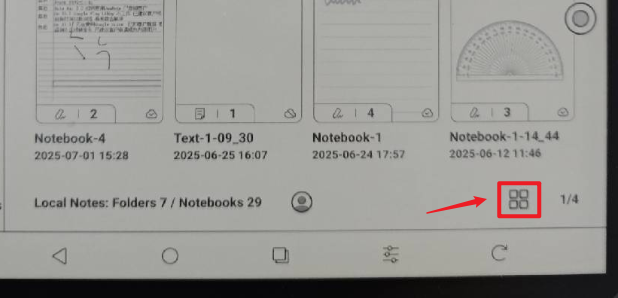
5) We are afraid that the size of the notebook cover in the Notes app can not be changed. However, you can click the display mode icon at the bottom right to change the display mode to detail mode or list mode to show more notebooks on one page.
6) Regarding the shortcut of opening apps, you can use the NaviBall to quickly open apps. You can go to Settings > More Settings > NaviBall > Select a button > Select "Open App" and select an app to open.
We have forwarded your feedback and suggestions to the relevant department and will do our best to improve our device in the future. We highly appreciate your support and understanding!
Please sign in to leave a comment.
Comments
1 comment